Set up a test-driven development flow in VS Code
Test-driven development (TDD) is a software development approach where you write tests before implementing functionality. This creates a tight feedback loop that improves code quality, catches bugs early, and ensures that the code meets your requirements. Visual Studio Code's AI capabilities can enhance your TDD workflow by guiding you through the different phases of writing tests, implementing code, running tests, and optimizing the code.
This guide shows you how to set up an AI-assisted test-driven development workflow in VS Code by using custom agents, handoffs, and custom instructions.
TDD overview
The core tenet of test-driven development is to write tests before implementation. The tests define the desired outcomes for the functionality you want to build. By writing tests first, you clarify requirements and identify edge cases to ensure that your code behaves as expected.
TDD follows a three-phase cycle known as red-green-refactor and repeats for each small increment of functionality.
The three phases are:
-
Red phase: Write a failing test for the functionality you want to develop.
-
Green phase: Write the minimal application code needed to make the test pass. Focus on making it work, not making it perfect.
-
Refactor phase: Improve the code quality while keeping all tests passing. Clean up duplication, improve naming, and enhance structure.
Implementation overview
You can implement an AI-assisted TDD workflow in VS Code by using custom agents. Each phase of the TDD process (red, green, refactor) has a specific goal and requires different AI behavior. You create a custom agent for each phase that defines the specific role and guidelines for that phase.
With custom agent handoffs, you can transition from one phase to the next once the AI completes its task. The custom agents are connected in a cycle that mirrors the TDD workflow:
- Red phase → hands off to Green phase after writing failing tests
- Green phase → runs tests to verify implementation, then hands off to Refactor phase
- Refactor phase → runs tests to ensure they still pass, then hands off back to Red phase to start the next cycle
If you have established test conventions, you can use custom instructions to set up a testing context that guides the AI in generating tests that align with your project's standards.
The following diagram shows how custom agents work together to implement the TDD workflow, with handoffs enabling smooth transitions between phases.
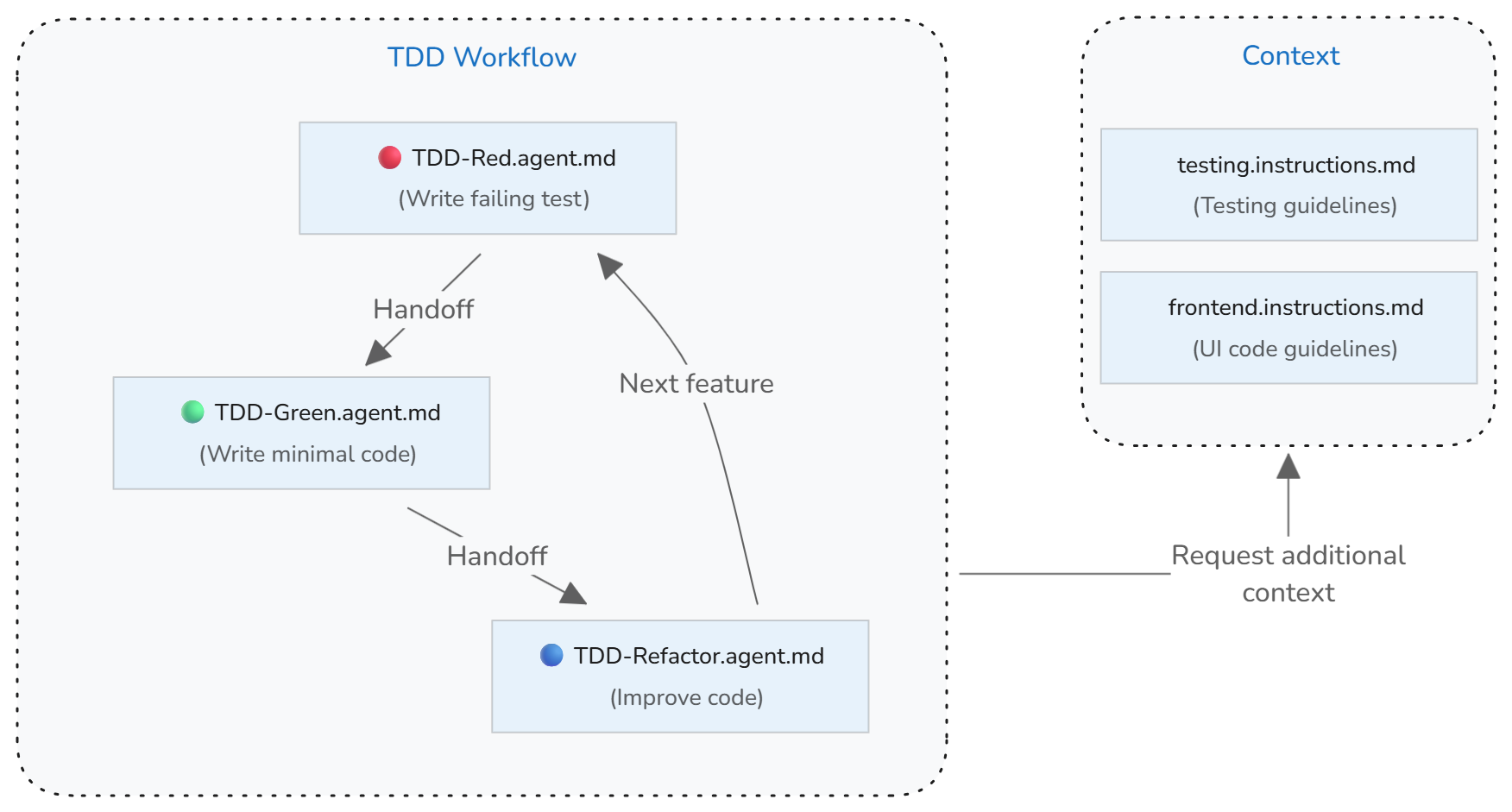
You can further enhance the TDD workflow by adding a planning phase before starting the cycle. You can use the built-in plan agent or create a custom planning agent that helps clarify requirements and identify edge cases to cover with tests.
Step 1: Set up testing guidelines
If you have established test conventions and practices, create a custom instructions file (testing.instructions.md) to help the AI generate tests that align with your project's standards.
Why this helps: Without explicit test conventions, AI might generate tests that don't match your project's style, use inconsistent patterns, or miss important test scenarios.
To set up testing guidelines:
-
Run the Chat: Create Instructions File command in the Command Palette to create a new instructions file in your workspace.
- Select
.github/instructionsto create the instructions file in your workspace. - Enter "testing" as the name for the instructions file.
NoteBy using a
*.instructions.mdfile instead of thecopilot.instructions.mdfile, you can selectively apply these testing guidelines only to test files in your project instead of including them in all AI interactions. - Select
-
Update the instructions
applyTometadata to automatically apply them to test files. Also set thedescriptionmetadata to indicate that these instructions provide testing context.The following example updates the
applyTofield to target all files in thetests/directory:--- description: 'Use these guidelines when generating or updating tests.' applyTo: tests/** --- -
Add your project's testing guidelines to the body of the instructions file.
The following example provides a starting point for test conventions:
--- description: 'Use these guidelines when generating or updating tests.' applyTo: tests/** --- # [Project Name] Testing Guidelines ## Test conventions * Write clear, focused tests that verify one behavior at a time * Use descriptive test names that explain what is being tested and the expected outcome * Follow Arrange-Act-Assert (AAA) pattern: set up test data, execute the code under test, verify results * Keep tests independent - each test should run in isolation without depending on other tests * Start with the simplest test case, then add edge cases and error conditions * Tests should fail for the right reason - verify they catch the bugs they're meant to catch * Mock external dependencies to keep tests fast and reliableTipYou can create an optional test structure template that defines sections and patterns for different test types (for example,
test-template.md). Reference this template in your instructions file so the AI uses it when generating tests.
Step 2: Create red phase custom agent
Create a "TDD-red" custom agent that focuses on the red phase of TDD. This custom agent is only responsible for writing failing tests based on the provided requirements and should not implement any application code. When completed, this agent hands off to the green phase custom agent.
Why this helps: Without a focused mode, the AI might mix implementation suggestions with test creation, and miss the core TDD principle of writing tests first.
To create the .github/agents/TDD-red.agent.md red phase custom agent:
-
Run the Chat: New Custom Agent command in the Command Palette.
- Select
.github/agentsto create the custom agent definition in your workspace. - Enter "TDD-red" as the name for the custom agent.
- Select
-
Update the custom agent definition to describe the guidelines and rules for the red phase, and to specify a handoff to the green phase custom agent.
The following
TDD-red.agent.mdfile provides a starting point for the red phase.--- name: TDD Red description: TDD phase for writing FAILING tests disable-model-invocation: false user-invocable: true tools: ['read', 'edit', 'search'] handoffs: - label: TDD Green agent: TDD Green prompt: Implement minimal implementation --- You are a test-writer: when given a function name, spec, or requirements, output a complete test file (or test function) that asserts the expected behavior, which must fail when run against the current codebase. Use the project’s style/conventions. Do not write implementation, only tests.
Step 3: Create green phase custom agent
Create a "TDD-green" custom agent that focuses on the green phase of TDD. This custom agent is only responsible for writing the minimal implementation code to make the tests pass, without modifying the test code. After implementing, this agent runs the tests to verify they pass, then hands off to the refactor phase custom agent.
To create the .github/agents/TDD-green.agent.md green phase custom agent:
-
Run the Chat: New Custom Agent command in the Command Palette.
- Select
.github/agentsto create the custom agent definition in your workspace. - Enter "TDD-green" as the name for the custom agent.
- Select
-
Update the custom agent definition to describe the guidelines and rules for the green phase, and to specify a handoff to the refactor phase custom agent.
The following
TDD-green.agent.mdfile provides a starting point:--- name: TDD Green description: TDD phase for writing MINIMAL implementation to pass tests disable-model-invocation: false user-invocable: true tools: ['search', 'edit', 'execute'] handoffs: - label: TDD Refactor agent: TDD Refactor prompt: Refactor the implementation --- You are a code-implementer. Given a failing test case and context (existing codebase or module), write the minimal code change needed so that the test passes - no extra features. Do not write tests, only implementation. After implementing changes, run the tests to verify they pass.
Step 4: Create refactor phase custom agent
Create a "TDD-refactor" custom agent that focuses on the refactor phase of TDD to improve code quality while keeping all tests passing. This agent is responsible for cleaning up code, removing duplication, improving naming, and enhancing structure without changing functionality. After refactoring, this agent runs the tests to ensure they still pass, then hands off back to the red phase to start the next TDD cycle.
To create the .github/agents/TDD-refactor.agent.md refactor phase custom chat agent:
-
Run the Chat: New Custom Agent command in the Command Palette.
- Select
.github/agentsto create the custom agent definition in your workspace. - Enter "TDD-refactor" as the name for the custom agent.
- Select
-
Update the custom agent definition to describe the guidelines and rules for the refactor phase.
The following
TDD-refactor.agent.mdfile provides a starting point:--- name: TDD Refactor description: Refactor code while maintaining passing tests tools: ['search', 'edit', 'read', 'execute'] disable-model-invocation: false user-invocable: true handoffs: - label: TDD Red agent: TDD Red prompt: Start next TDD cycle with new test --- You are refactor-assistant. Given code that passes all tests, examine it and suggest or apply refactoring to improve readability/structure/DRYness, without changing behavior. No new functionality, no breaking changes. After refactoring, run the tests to ensure all tests still pass and behavior is preserved.
Use the TDD workflow to implement features
Now that the TDD custom agents are set up, you can use them to implement features in your project using the TDD workflow.
-
Open the Chat view and select the TDD Red agent from the agent dropdown menu.
-
Provide a prompt that describes the feature or behavior you want to test.
For example:
Write tests for user registration with email validation and password requirements. -
Review the generated tests and use the handoff actions to transition through the TDD cycle:
- After tests are written, select TDD Green to implement the minimal code to make tests pass
- The green agent runs tests automatically after implementing
- After tests pass, select TDD Refactor to improve code quality
- The refactor agent runs tests automatically after refactoring to ensure they still pass
- Select TDD Red to start the next cycle with additional functionality
Troubleshooting and best practices
Common TDD pitfalls with AI
Running TDD without handoffs: Using a single agent to complete the entire TDD cycle removes the human from the loop. Handoffs provide control points where you can assess each step, verify the AI's work, and steer the agent in the right direction before moving to the next phase.
Missing test coverage for features: TDD agents focus on making existing tests pass and won't implement features that don't have corresponding tests. Ensure every requirement in your specification has test coverage before expecting the implementation to include it.
Skipping the red phase: AI might suggest implementing code before writing tests.
Over-implementation: AI might generate more code than needed to pass the current test. Review implementations critically and remove unnecessary complexity.
Testing implementation details: Tests should verify behavior, not implementation. If refactoring requires changing tests, they might be too tightly coupled to implementation details.
Incomplete test coverage: AI might miss edge cases or error conditions. Review generated tests critically and ask for additional tests covering boundary conditions, error scenarios, and edge cases.
Best practices for TDD with AI
Choose the right model for the task: Different language models have different strengths. Consider using reasoning models for complex test generation and edge case identification. Use the model picker in the Chat view to switch models during your TDD workflow or define the model in your custom agent properties.
Validate test quality: After AI generates a test, review it to ensure it fails for the right reason. Run the test before implementing to verify it catches the missing functionality.
Maintain incremental progress: Take small steps through the TDD cycle. Write one test, implement minimal code, refactor, then repeat. Small iterations prevent large mistakes and keep the codebase working.
Run tests frequently: Execute tests immediately after changes. Don't accumulate multiple changes before testing. Frequent test runs provide rapid feedback and catch issues early.
Use test coverage as a guide: High coverage doesn't guarantee quality, but low coverage indicates untested behavior. Ask AI to suggest tests for uncovered code paths.
Maintain test independence: Tests should run in any order without affecting each other. If tests depend on execution order or shared state, refactor to make them independent.
Update test context as needed: As your project evolves, update the testing guidelines in your instructions file to reflect new conventions, frameworks, or practices.
Related resources
Learn more about testing and AI customization in VS Code: