February 2026 (version 1.110)
Release date: March 4, 2026
Downloads for 1.110.1
Security update: The following extension has security updates: GitHub.copilot-chat.
Update 1.110.1: The update addresses these security issues in core and these security issues in the GitHub Copilot Chat extension.
Welcome to the February 2026 release of Visual Studio Code. This release makes agents practical for longer-running and more complex tasks, giving you more control and visibility, new ways to extend agents, and smarter session management.
-
Agent plugins: install prepackaged bundles of skills, tools, and hooks from the Extensions view
-
Agentic browser tools: let the agent drive the browser to interact with your app and verify its own changes
-
Session memory: persist plans and guidance across conversation turns
-
Context compaction: manually compact conversation history to free up context space
-
Fork a chat session: create a new, independent session that inherits conversation history to explore alternative approaches
-
Agent Debug panel: get real-time visibility into agent events, tool calls, and loaded customizations
-
Chat accessibility: use chat to its fullest with screen reader improvements, keyboard navigation, and notification signals
-
Create agent customizations from chat: generate prompts, skills, agents, and hooks directly from a conversation
-
Kitty graphics protocol: render high-fidelity images directly in the integrated terminal
Happy Coding!
If you'd like to read these release notes online, go to Updates on code.visualstudio.com.
Insiders: Want to try new features as soon as possible?
You can download the nightly Insiders build and try the latest updates as soon as they are available.
Download Insiders
Agent controls
Whether you are debugging an agent's behavior, tweaking approval flows, or handing work off to a background process, these updates give you more visibility and control over how agents run.
Background agents
With background agents, you can hand off tasks to Copilot CLI, while still keeping track of them in VS Code. We have made several improvements to align the capabilities and experience of background agents with local and cloud agents.
-
Context compaction: Copilot automatically compacts the conversation history when the context window reaches its limit. You can now also manually trigger compaction for background agents with the
/compactslash command. -
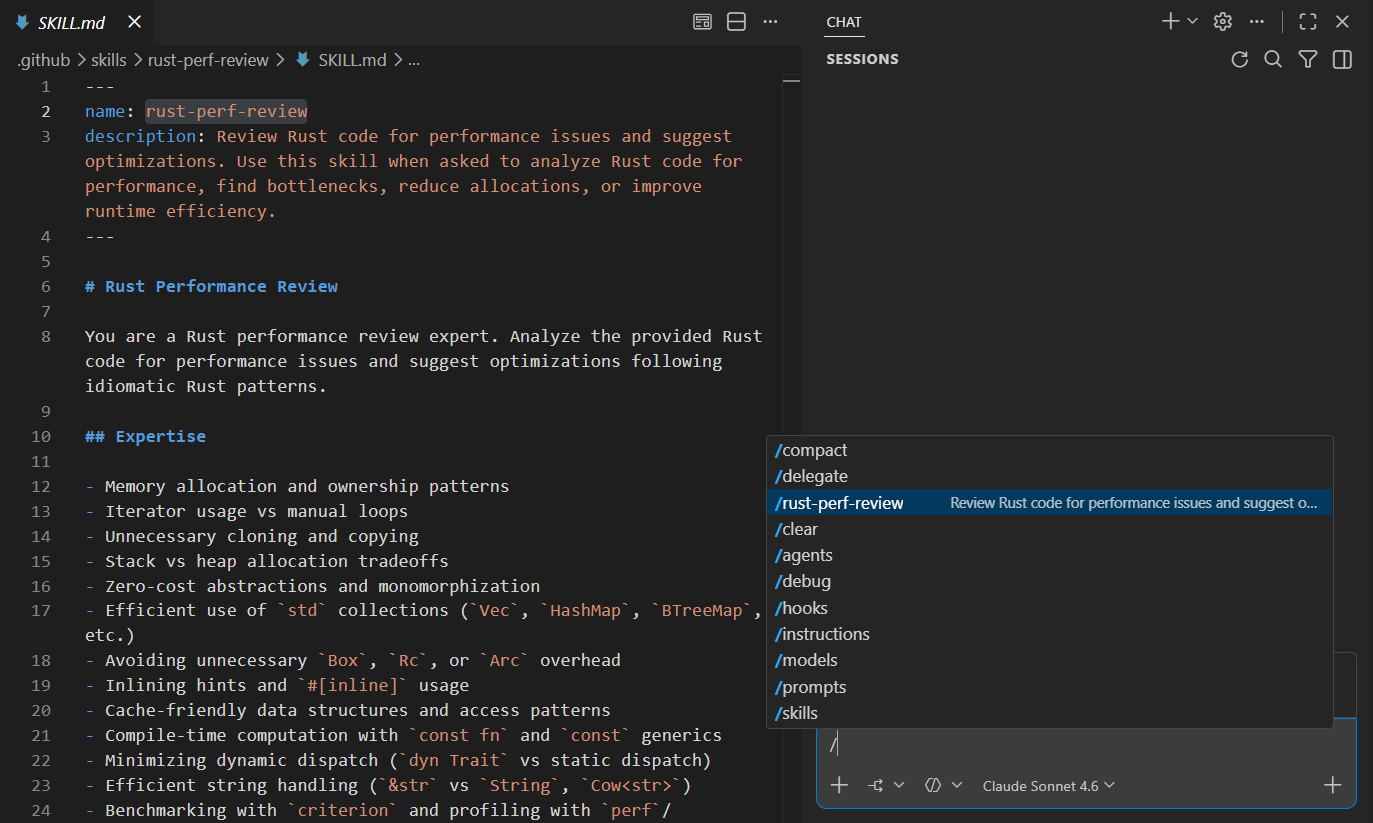
Use /slash commands: chat customization options like prompt files, hooks, and skills are now also available in background agent sessions as slash commands.
-
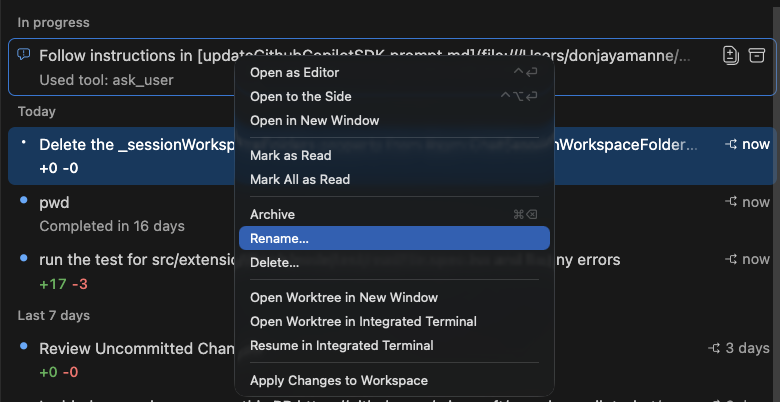
Rename background agent sessions: you can now rename your background agent sessions to keep track of them more easily.
Claude agents
Last month, we added Claude agents, enabling you to interact with the Claude Agent SDK using Claude models included in your GitHub Copilot subscription.
This month, we've expanded this experience with new features and improvements:
-
Steering and queuing to let you send follow-up messages mid-conversation to alter the agent's approach or to queue up additional requests.
-
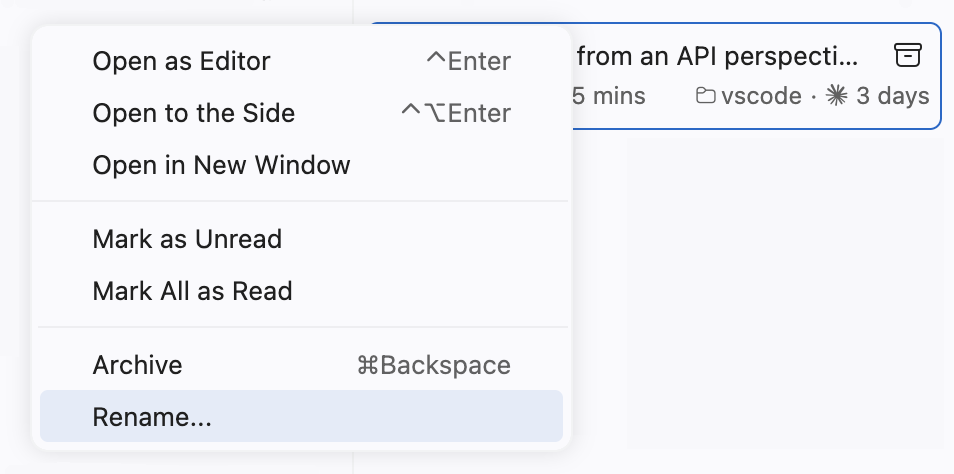
Session renaming
-
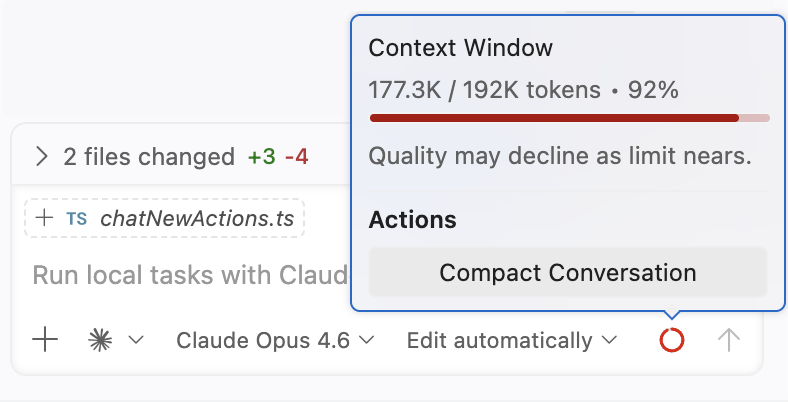
Context window rendering with compaction
-
Additional slash commands
/compactfor on-demand compaction/agentsto manage custom agents/hooksto manage Claude hooks
-
Add the
getDiagnosticstool to let the agent access editor and workspace problems -
Significant performance improvements
More improvements are planned. Share your feedback on GitHub!
Agent Debug panel (Preview)
With different agent customizations like hooks, skills, and custom agents, it can sometimes be difficult to understand what happens when you send a message to an agent. The Agent Debug panel gives you deeper visibility into your chat sessions and how your chat customizations are loaded.
The Agent Debug panel shows chat events in real time, including chat customization events, system prompts, tool calls, and more. You can see exactly which prompt files, skills, hooks, and other customizations are loaded for a session, making it easier to understand and troubleshoot your agent configuration. This replaces the old Diagnostics chat action with a richer, more detailed view.
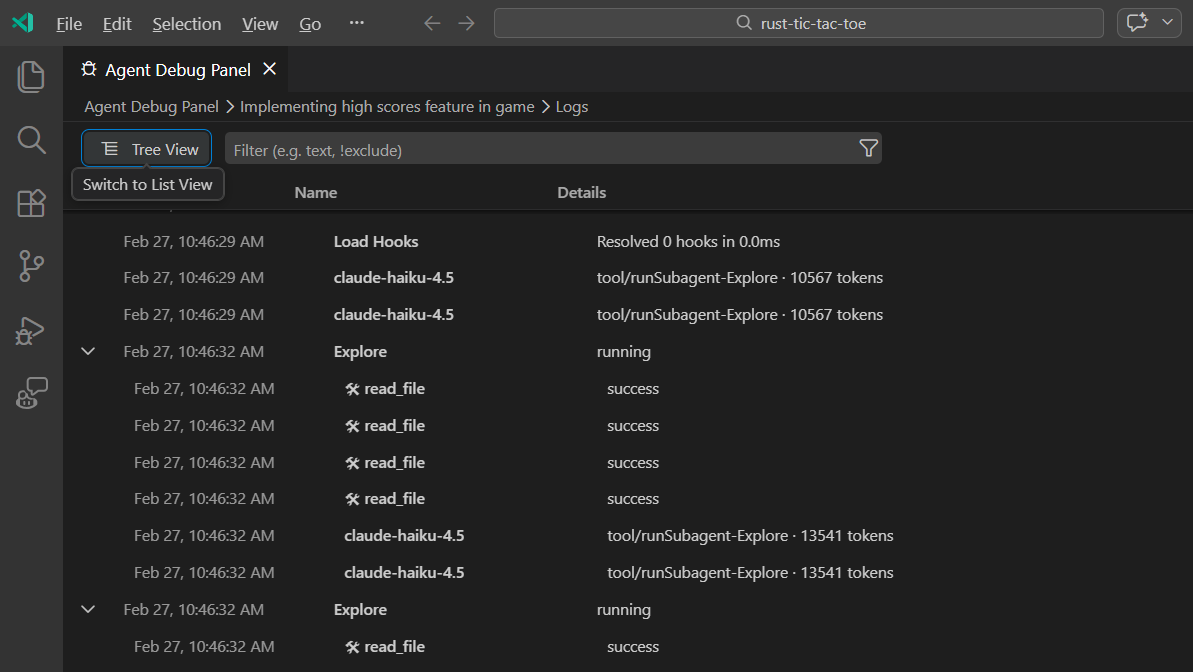
Open the panel from the Command Palette with Developer: Open Agent Debug Panel, or select the gear icon at the top of the Chat view and choose View Agent Logs.
The panel also includes a chart view that displays a visual hierarchy of events, so you can quickly understand the structure and sequence of what happens during a chat session.
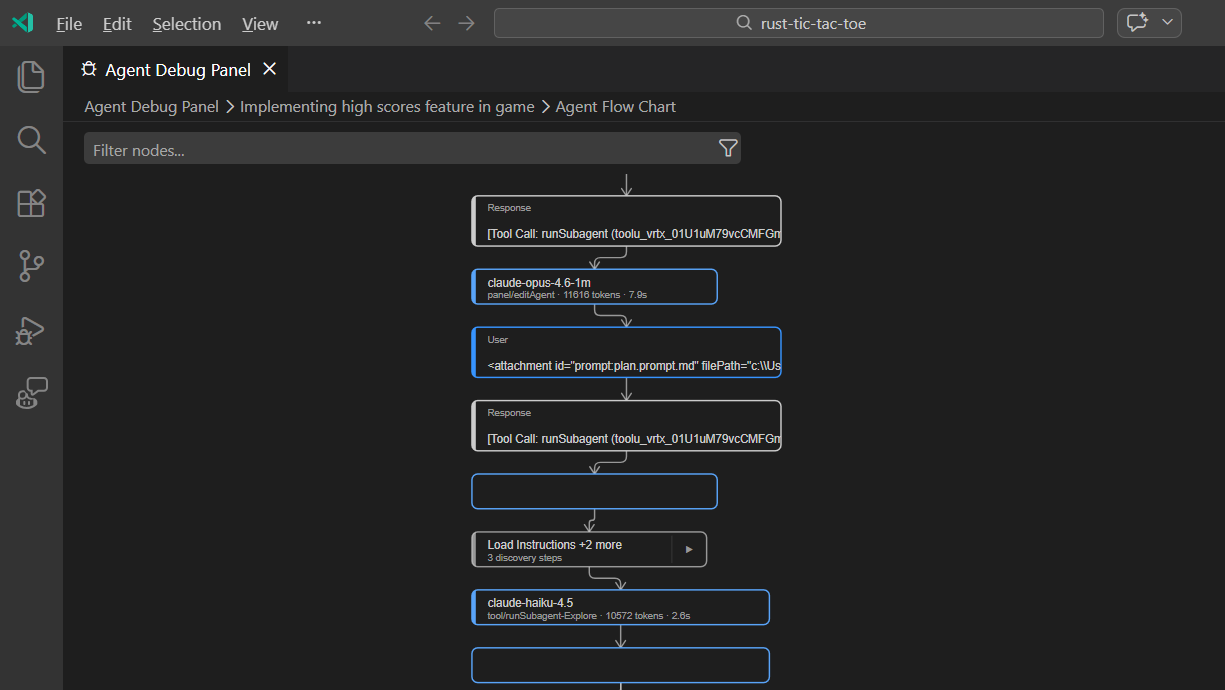
This experience is still in preview, so try it out and share your feedback!
Note: The Agent Debug panel is currently only available for local chat sessions. Log data is not persisted, so you can only view logs for chat sessions from your current VS Code session.
Slash commands for enabling auto approval
You can now toggle global auto approve directly from the chat input using slash commands, without navigating to settings:
/autoApproveenables global auto approve for all tools/disableAutoApprovedisables global auto approve
/yolo and /disableYolo are aliases for the same commands.
CAUTION: Global auto approve skips all tool confirmation prompts, letting the agent run tools and terminal commands without waiting for your approval. This can speed up longer, multi-step tasks but means you won't have the opportunity to cancel potentially destructive actions. Make sure you understand the security implications before enabling it and consider using terminal sandboxing for additional protection.
Edit and ask mode changes
Setting: chat.editMode.hidden
As agents have evolved, agent mode now handles everything edit mode can do and more, with better performance and reliability. Edit mode is now hidden from the agent picker by default, so users benefit from the most capable mode without having to choose between options. You can bring it back by disabling the chat.editMode.hidden setting.
Ask mode is now backed by a custom agent definition, making it a fully agentic experience. This resolves previous limitations, such as requiring a new session when switching between ask and agent mode.
Both changes demonstrate how to customize your own agents. If you prefer edit mode or want your own version of ask mode, create a custom agent that matches your needs by defining its tools, prompt, and language model. When you disable chat.editMode.hidden , you can select the View edit agent action in the agent picker to view the agent declaration that powers edit mode, which can serve as a starting point for your own custom agent.
Learn how to create custom agents in the custom agents documentation.
Ask questions tool
The askQuestions tool, which presents a question carousel UI during chat interactions, has been moved into VS Code core. This improves reliability when canceling requests and enables the tool to work consistently across different contexts, including subagents.
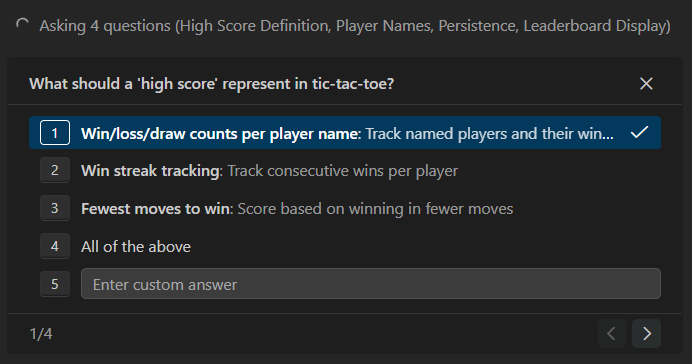
When the carousel is active, you can now send a steering message without needing to reply to or dismiss pending questions first. This allows you to redirect the agent's response on the fly, even in the middle of a question sequence. Use the keyboard to navigate between questions with ⌥N (Windows, Linux Alt+N) (next) and ⌥P (Windows, Linux Alt+P) (previous).
Prevent auto-suspend during chat
VS Code now asks the operating system not to automatically suspend the machine while a chat request is running. You can step away from your computer without worrying about interrupting the agent's response.
Note that closing the lid of an unplugged laptop still triggers suspension.
Agent extensibility
Agents are only as useful as the tools and customizations you give them. This release makes it easier to extend what agents can do, from installable plugin bundles to browser automation and new code-aware tools.
Agent plugins (Experimental)
Settings: chat.plugins.enabled , chat.plugins.marketplaces , chat.plugins.paths
VS Code now supports agent plugins, which are prepackaged bundles of chat customizations. Plugins can contain skills, commands, agents, MCP servers, and hooks.
You can search and install agent plugins directly from the Extensions view within VS Code. Enter @agentPlugins in the search box or run the Chat: Plugins command from the Command Palette.
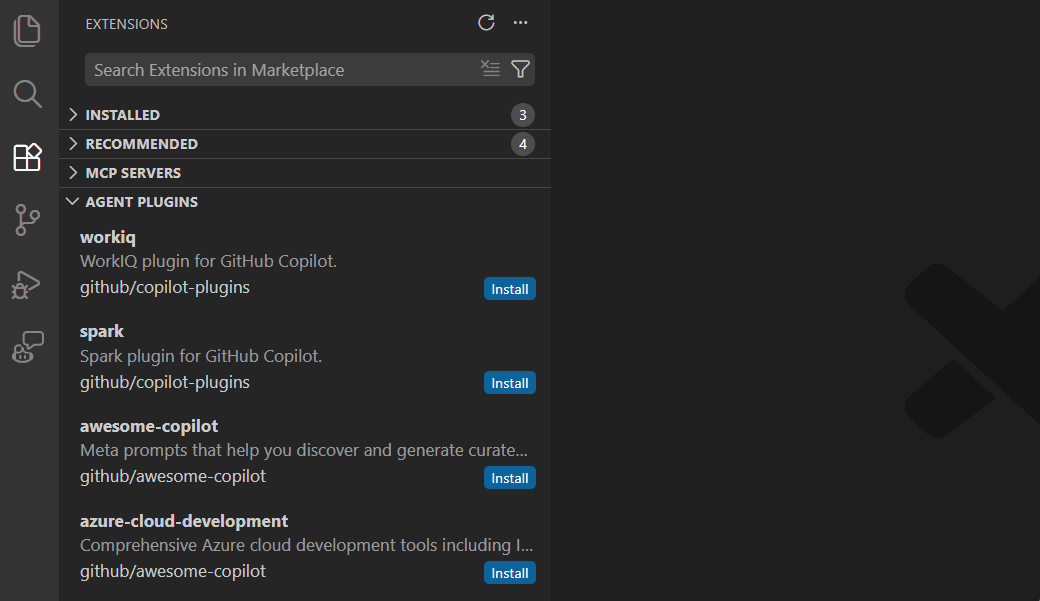
By default, VS Code retrieves plugins from the copilot-plugins and awesome-copilot repos. You can configure more sources via the following settings:
-
chat.plugins.marketplaces
: add additional plugin marketplaces by specifying GitHub or plain git repositories. The setting can also support Claude-style marketplaces such as
anthropics/claude-code. - chat.plugins.paths : register local plugin directories by specifying their paths and enabling or disabling them.
Learn more about agent plugins in the agent plugins documentation.
Agentic browser tools (Experimental)
Setting: workbench.browser.enableChatTools
In the previous release, we added a new integrated browser in VS Code desktop which lets you interact with web pages directly within the editor. But what if your agent could autonomously use this browser and validate changes to your website while it's building it?
In this release, we added a set of tools for agents to read and interact with the integrated browser. As the agent interacts with the page, it sees updates to page content and any errors and warnings in the console. The tools work out of the box without the need to install any extra dependencies.
- Page navigation:
openBrowserPage,navigatePage - Page content and appearance:
readPage,screenshotPage - User interaction:
clickElement,hoverElement,dragElement,typeInPage,handleDialog - Custom browser automation:
runPlaywrightCode
These tools give agents the ability to perform simultaneous authoring and verification of web apps and close the development loop for agents.
By default, pages opened by the agent run in private, in-memory sessions. This gives you control over what browsing data the agent can access. To give the agent access to a specific web page in the integrated browser, you can explicitly share the page with the agent to give temporary access and any saved data.
To try out the new tools, enable workbench.browser.enableChatTools and enable the browser tools in the chat tools picker.
Get started with the browser agent testing guide for a step-by-step tutorial.
Create agent customizations from chat
You can now generate agent customization files directly from a chat conversation by using new /create-* slash commands in agent mode:
/create-prompt: generate a reusable prompt file/create-instruction: generate an instruction file for project conventions/create-skill: extract a multi-step workflow into a skill package/create-agent: create a specialized custom agent persona/create-hook: create a hook configuration for lifecycle automation
Each command guides you through the creation process and lets you choose between user-level (account-wide) or workspace-level (project-specific) storage.
The commands can also extract patterns from an ongoing conversation. For example, after debugging an issue over several turns, use /create-skill to capture the procedure as a reusable skill, or /create-instruction to turn corrections into project conventions.
You don't need to remember the exact slash command. You can also use natural language, such as "save this workflow as a skill" or "extract an instruction from this", and the agent recognizes your intent and starts the correct creation flow.
The same generation options are available from the quick pick menus for prompts, instructions, skills, and agents, indicated by a sparkle icon.
Tools for usages and rename
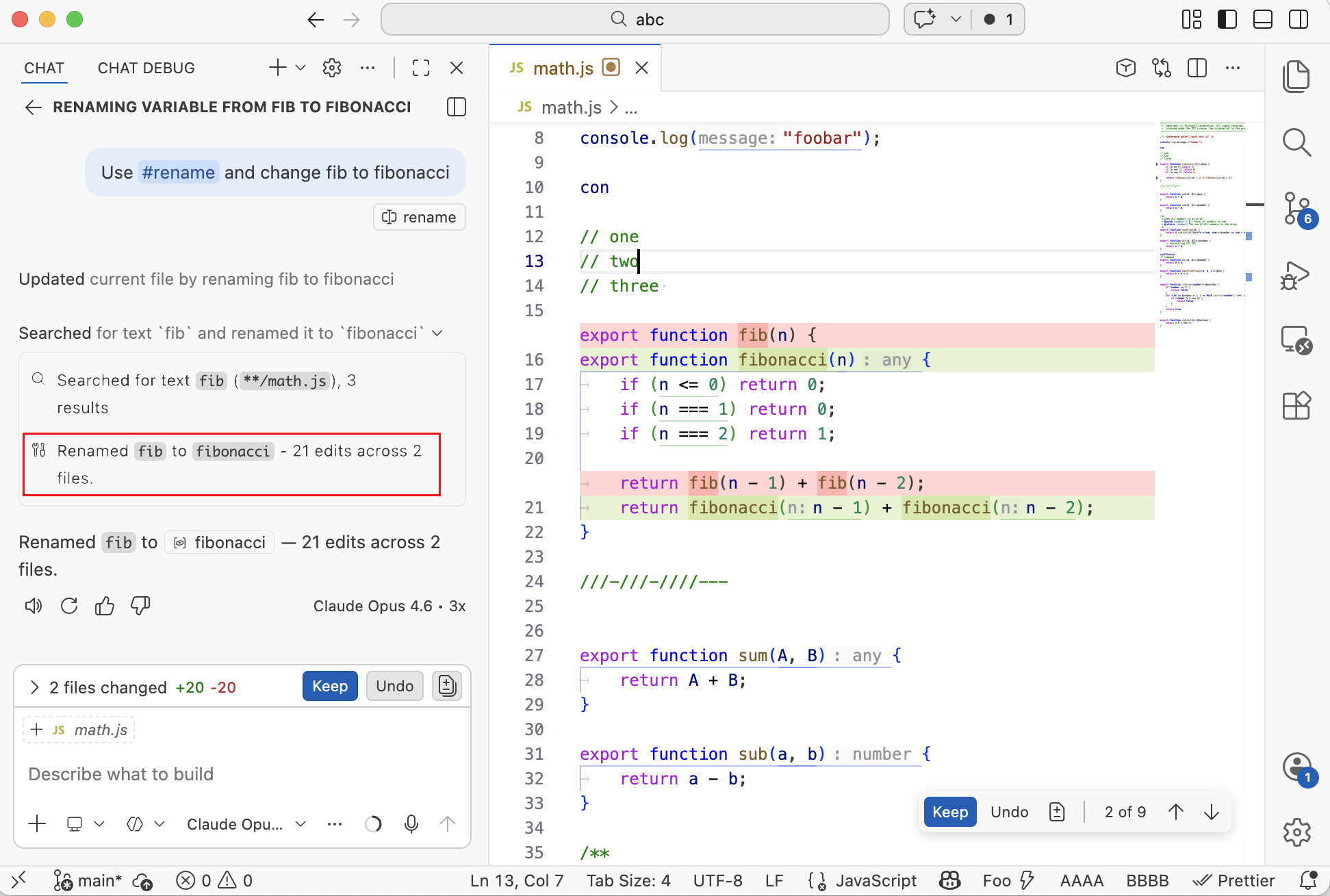
We have updated the usages-tool and also added a tool for rename. These tools reuse existing extension or LSP capabilities and allow agents to navigate and refactor code with high precision and best performance.
Agents should automatically pick up these new tools. However, we have found that agents have a strong preference for using grep instead, which is inferior for this scenario. You can help the agent by explicitly #-mentioning the tool names, like Use #rename and change the name of fib to fibonacci or by setting up a SKILL.md file.
Smarter sessions
Long-running and multi-turn tasks work better when the agent remembers context, delegates research efficiently, and keeps your inline edits in sync. These improvements make sessions more resilient and context-aware.
Session memory for plans
Plans created by the Plan agent now persist to session memory and stay available across conversation turns. When you ask for refinements, the agent builds on the existing plan instead of starting from scratch.
The plan is also recalled after unrelated messages in the same session, so you can return to a plan without repeating context. During longer implementation work, the plan remains accessible in memory even when older conversation history is compacted to free up context space.
Context compaction
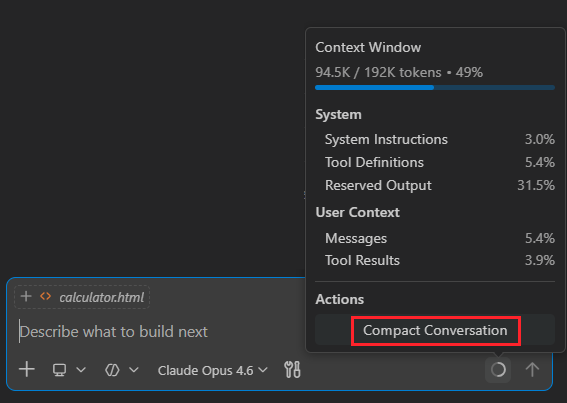
As a conversation grows, the accumulated messages and context can fill up the model's context window. Context compaction summarizes the conversation history to free up space, so you can continue working in the same session without losing important details.
VS Code automatically compacts the conversation when the context window reaches its limit, but you can also trigger compaction manually. Manual compaction is available for local, background, and Claude agent sessions. To manually compact, use one of the following methods:
-
Type
/compactin the chat input field. Optionally, add custom instructions after the command to guide how the summary is generated, for example/compact focus on the database schema decisions. -
Select the context window control in the chat input box, and then select Compact Conversation.
Learn more about context compaction in the documentation.
Codebase search with Explore subagent
Setting: chat.exploreAgent.defaultModel
The Plan agent now always delegates codebase research to a dedicated Explore subagent. Explore is a read-only agent that uses only search and file read tools, and focuses on fast, parallelized codebase exploration. By offloading research to Explore, the Plan agent can produce plans that reference specific files and code paths in your workspace.
Explore runs on fast models by default (Claude Haiku 4.5, Gemini 3 Flash) to keep research quick while the Plan agent uses the full model for planning. You can override the model with the chat.exploreAgent.defaultModel setting. Hover over the explore task in chat to see which model is being used for research.
Note: Explore is not directly invokable as a standalone agent. It is only available as a subagent used on-demand.
Inline chat and chat session
When an agent session already changed a file, inline chat now always queues new messages into that session instead of making changes in isolation. This ensures that the full context is used and is also useful when reviewing agent edits.
Fork a chat session
You can now fork a chat session to create a new, independent session that inherits the conversation history from the original. This is useful when you want to explore an alternative approach, ask a side question, or branch a long conversation in a different direction without losing the original context.
There are two ways to fork a session:
- Fork the entire session: type
/forkin the chat input box to create a new session with the full conversation history. - Fork from a checkpoint: hover over any chat request and select Fork Conversation to create a new session that includes only the conversation up to that point.
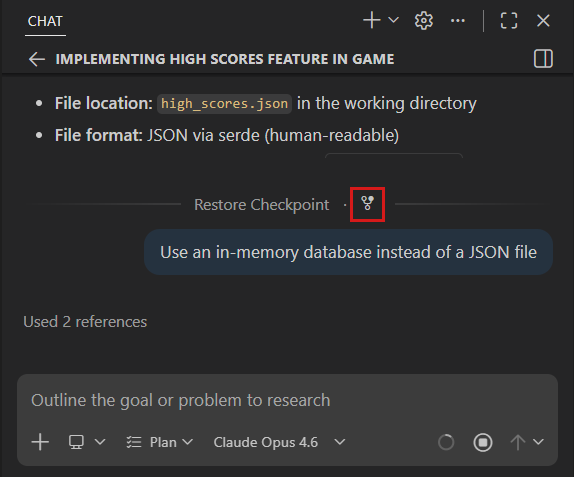
The forked session is fully independent—changes in one session do not affect the other. Learn more about forking chat sessions.
Chat experience
Small refinements to the chat interface add up: a cleaner model picker, less visual clutter from tool output, and notifications that reach you even when you are heads-down in another file.
Redesigned model picker
We have redesigned the language model dropdown to improve selecting the right model for the task. The new dropdown organizes models into clear sections:
- Auto is always shown at the top of the list.
- Featured and recently used models appear next. Up to four recently used models are shown alongside featured models curated for your account. As you use models, they move into this section automatically.
- Other models is a collapsible group that contains the remaining available models. Expanding it also reveals the Manage Models option at the bottom.
- A search box lets you quickly filter models by name.
Each model entry shows a rich hover with model details such as capabilities and context window size. Models that are unavailable on your current GitHub Copilot plan are also shown but are not selectable.
Discover features with contextual tips (Experimental)
Setting: chat.tips.enabled
VS Code now shows contextual tips in the Chat view to help you discover features and get the most out of your AI coding experience. Tips appear when you start a new chat session and are tailored to your usage patterns. To avoid being overwhelming, only features you haven't tried yet are suggested, making them relevant and actionable.
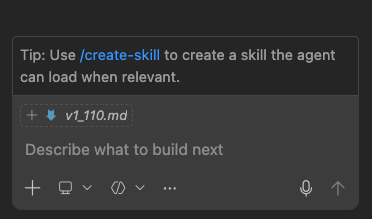
Tips cover a variety of capabilities including:
- Creating custom agents, prompts, and skills
- Using message queueing and steering
- Switching to better models
- Enabling experimental features like YOLO mode and custom thinking phrases
Use the navigation controls to browse through available tips, or dismiss individual tips you're not interested in. Tips automatically hide once you've used the suggested feature. You can disable tips entirely with chat.tips.enabled .
New tips are added regularly as features are released, so check back often for fresh suggestions.
Custom thinking phrases
Settings: chat.agent.thinking.phrases
The loading text that is shown during reasoning or during tool calls is now customizable. You can use the predefined custom phrases to complete the existing default phrases with the replace mode, or have custom phrases be an addition to the existing default phrases with append.
Example of replacing the defaults:
  "chat.agent.thinking.phrases": {
    "mode": "replace",
    "phrases": [
      "Bribing the hamster",
      "Reticulating splines",
      "Untangling the spaghetti"
    ]
  },
This setting lets you personalize the chat loading experience.
Collapsible terminal tool calls
Settings: chat.tools.terminal.simpleCollapsible
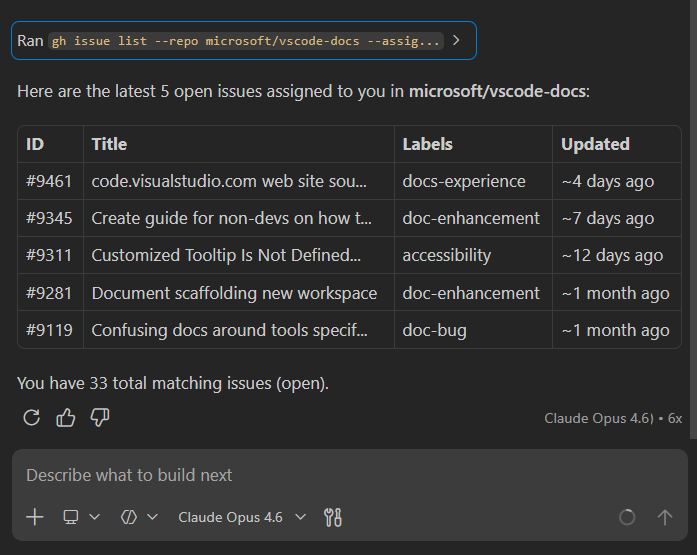
Terminal tool invocations in agent mode are now displayed as collapsible sections. Instead of long terminal outputs cluttering the conversation, each terminal command appears as a summary header that you can expand to reveal the full output. This reduces visual noise and makes it easier to scan through multi-step agent interactions. This functionality can be disabled with the chat.tools.terminal.simpleCollapsible setting.
OS notifications for chat responses and confirmations
Settings: chat.notifyWindowOnResponseReceived , chat.notifyWindowOnConfirmation
Previously, OS notifications for chat responses and confirmation requests only appeared when VS Code was not focused. This meant that if you were actively working on another task in VS Code, you might miss important updates like when a response is received or when the agent needs your confirmation to proceed.
You can now configure these notifications to appear even when the window is in focus by setting the settings value to always.
Inline chat hover mode
Setting: inlineChat.renderMode
Inline chat is transitioning away from the "in-between lines" UI to a hover-based UI. You can enable it via inlineChat.renderMode , which makes the inline chat input more like the rename experience. Once a prompt is submitted, progress and results are shown in the upper right corner.
Inline chat affordance
Setting: inlineChat.affordance
To provide an easier way of starting inline chat, we added two kinds of affordances that show alongside your selection. They combine with the lightbulb and should not get in your way.
The inlineChat.affordance setting has three possible values:
offNo affordance is shown on text selection |
|
editorShow a menu in the editor alongside the selection |
|
gutterShow a menu in the editor gutter (line number area) next to the selection |
Accessibility
This release improves screen reader support, keyboard navigation, and awareness of chat interactions so that every developer can work effectively with VS Code's AI features.
Toggle thinking content in the accessible view
Screen reader users can now toggle the inclusion of thinking content in the chat response accessible view ⌥T (Windows, Linux Alt+T). This lets you choose whether to include the model's reasoning process when reading responses, providing flexibility to either follow the full chain of thought or focus only on the final output.
Question carousel accessibility
The chat question carousel is now fully accessible to screen reader users:
- Questions are announced with their position (for example, "Question 1 of 3")
- Use Alt+N and Alt+P to navigate between questions
- Use ⇧⌘A (Windows, Linux Ctrl+Shift+A) to toggle focus between the question carousel and chat input
- In screen reader mode, focus no longer automatically moves to prevent disruption
Notifications for chat questions and confirmations
Settings: chat.notifyWindowOnConfirmation , accessibility.signals.chatUserActionRequired
When chat asks a question or requires confirmation, VS Code now plays an accessibility signal and shows an OS notification when enabled. This helps you stay aware of pending actions even when working in another window.
Keybinding to toggle TODO list focus
Use ⇧⌘T (Windows, Linux Ctrl+Shift+T) to quickly toggle focus between the agent TODO list and the chat input. This is particularly helpful for screen reader users to get an overview of pending tasks and return to the chat input.
Cursor position remembered in accessible view
When you close the accessible view while content is streaming (such as during a chat response), your cursor position is now preserved when you reopen it. This prevents the cursor from jumping back to the top and lets you continue reading from where you left off.
Find and filter accessibility help
Press Alt+F1 in any find or filter dialog to open contextual accessibility help. This includes help for:
- Editor find and replace
- Terminal find
- Search across files
- Output, Problems, and Debug Console filters
The help content explains available keyboard shortcuts, navigation patterns, and context-specific behaviors. Find widgets also announce "Press Alt+F1 for accessibility help" when focused (controlled by accessibility.verbosity.find ).
Quick input screen reader improvements
The Go to Line dialog (⌃G (Windows, Linux Ctrl+G)) and other quick input boxes now work better with screen readers:
- Characters are announced as you type
- Arrow key navigation works correctly within the input field
- Proper announcements when navigating list items
- Line and column position announced after navigation
Steering indicator for screen readers
When you send a steering message while a response is streaming, screen reader users now receive an aria-status announcement indicating that steering has occurred.
Accessibility skill
A new built-in accessibility skill helps ensure new features include proper accessibility support. When you ask the agent to create a new feature and make it accessible, it automatically references accessibility guidelines and patterns.
Checkmarks in chat
Settings: accessibility.chat.showCheckmarks
This iteration, in an effort to simplify the chat view and make it more consistent, checkmarks are now removed by default in front of tool calls and collapsible pieces. The accessibility.chat.showCheckmarks will re-enable checkmarks throughout the chat if you'd like to have them as indicators in the chat.
Editor Experience
Modal editors (Experimental)
Settings: workbench.editor.useModal , extensions.allowOpenInModalEditor
We are experimenting with a new modal editor experience for editors that you typically open briefly and then return to your active task. A modal editor floats on top of the editor without impacting the layout of your editor tabs. To close the modal editor, press Escape. The modal has an action to move the editor back into an editor tab, as well as an action to maximize the modal experience.
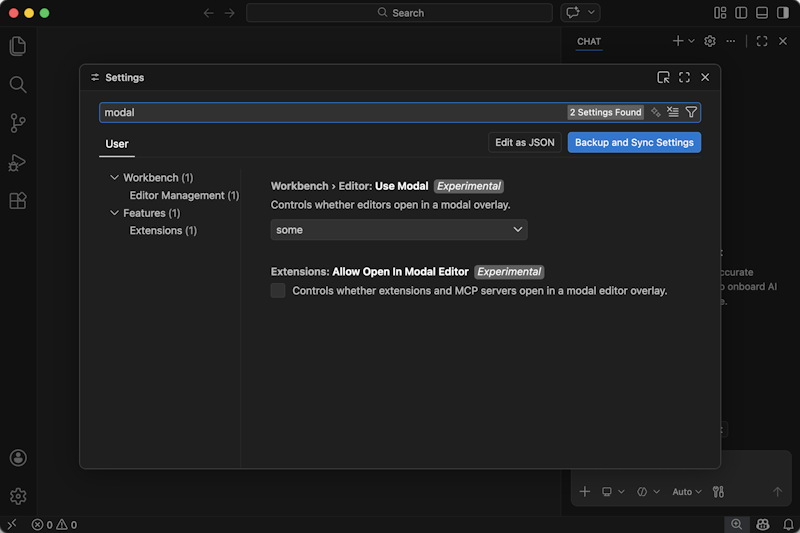
The modal experience applies to the following editors:
- Settings
- Keyboard shortcuts
- Profiles management
- AI and Language models management
- Workspace trust management
Set
workbench.editor.useModal
to some for opting into this experience.
Note: the Settings editor and Keyboard Shortcuts editor show a button to open the associated JSON file as a text editor
Another setting extensions.allowOpenInModalEditor expands the use of modal editors to extensions. This experience is still a work in progress and will likely change in the future but we wanted to make it available for feedback now:
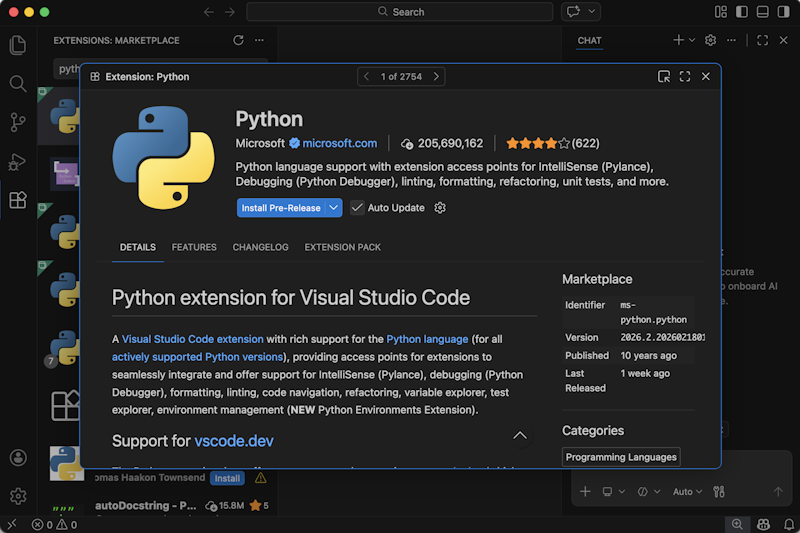
In this modal editor, a control in the title bar allows you to navigate between all extensions from the list you had in the Extensions view. The same applies to MCP servers. Future versions will likely see the extensions list and search functionality also move into the modal. Try it out and share your feedback.
Configurable notification position
Setting: workbench.notifications.position
Previously, VS Code notifications appeared in the bottom-right corner of the screen. With the default position of the Chat view also on the right, notifications could obscure the chat interface.
You can now configure the position of notifications to be either top-right, bottom-right or bottom-left. The default remains bottom-right. This setting enables you to choose the best position for your workflow.
Settings editor cleanup
We have moved the VS Code chat settings into their own top-level entry in the Settings editor with sub-categories. GitHub Copilot Chat extension entries remain in their own entry under Extensions.
The displayed list of settings is also scoped to the selected table of contents entry, meaning that once you select a table of contents entry, you cannot accidentally scroll into the next entry anymore.
Lastly, the experimental settings have been moved to the end of each section, so that stabilized settings appear first.
Code Editing
Long-distance next edit suggestions
Next edit suggestions (NES) extend ghost text by suggesting edits not just at your cursor, but also nearby, anticipating what you'd change next. We've been continuing to advance this experience with long-distance next edit suggestions, which extend NES to predict and suggest edits anywhere in your file, not just near your current cursor position.
Read the blog post on long-distance next edit suggestions to learn more about how it was built, from creating the training dataset, to refining the UX, evaluating success, and more. Make sure you have NES ( github.copilot.nextEditSuggestions.enabled ) and extended NES range ( github.copilot.nextEditSuggestions.extendedRange ) enabled in VS Code.
NES eagerness
The Copilot Status Bar item now includes an eagerness option for next edit suggestions. This option lets you choose between getting more suggestions that might be less relevant, or fewer suggestions that are more likely to be useful.
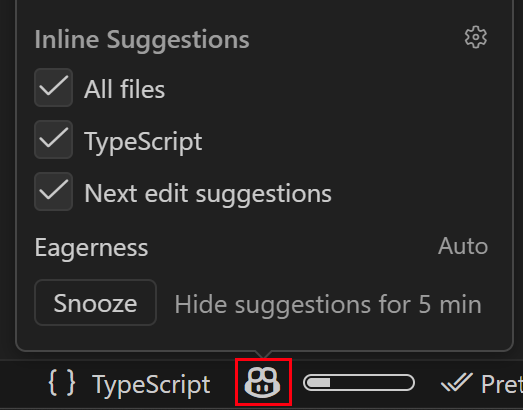
Initially, this option primarily affects the timing of suggestions. As the NES model evolves, it will increasingly take your eagerness preference into account for more fine-tuned suggestions.
Source Control
AI co-author attribution for commits
Setting: git.addAICoAuthor
VS Code can automatically append a Co-authored-by: trailer when you commit code that includes AI-generated contributions. Additionally, Git blame hover tooltips now show co-authors from commit trailers, including non-AI Co-authored-by entries.
Configure git.addAICoAuthor with one of these values:
off(default): does not add a co-author trailerchatAndAgent: adds the trailer for code generated with Copilot Chat or agent modeall: adds the trailer for all AI-generated code, including inline completions
VS Code only adds co-author trailers for commits you make from within VS Code. This setting does not modify commits made in external Git tools or the command line.
Debugging
JavaScript Debugger
Custom property replacements
If an object has a method defined using Symbol.for('debug.properties'), then those properties will be shown by default in the debugger. This allows you to provide a more comprehensible view of complex objects.
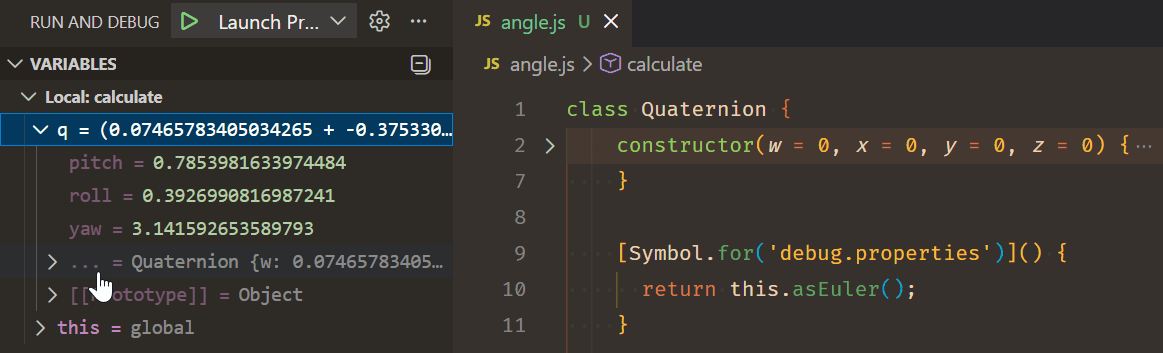
The original object properties are folded under a ... list item.
Emulate focused window and event listener breakpoints
Previously, when debugging a browser, you could set breakpoints in the Event Listener Breakpoints view. We have renamed this view to Browser Options.
We added an extra option to Emulate a focused page. When checked, moving your focus out of the browser window no longer causes the browser element to lose focus. This is useful for debugging elements that depend on hover or focus states.
Terminal
Kitty graphics protocol
Settings: terminal.integrated.enableImages , terminal.integrated.gpuAcceleration , terminal.integrated.windowsUseConptyDll
The VS Code terminal now supports the Kitty graphics protocol, enabling high-fidelity image rendering directly in the terminal. Programs that support this protocol can transmit and display images with a rich set of capabilities:
- Image formats: PNG, 24-bit RGB, and 32-bit RGBA
- Display layout: scale images to specific column/row dimensions, crop source regions, apply sub-cell pixel offsets, and control z-index stacking order
- Transmission: direct inline base64 with chunked transfer and zlib compression support
- Image management: transmit and display in one step, store images and place them later at different positions, delete by ID or all at once, and re-transmit to update existing images
- Cursor control: choose whether the cursor moves past the image or stays in place after rendering
- Terminal integration: images scroll with text, and are properly cleaned up on terminal reset or clear
To enable image rendering, set
terminal.integrated.enableImages
to true and ensure
terminal.integrated.gpuAcceleration
is set to on or auto. On Windows, you also need to enable
terminal.integrated.windowsUseConptyDll
.
Tools like kitten icat (macOS/Linux) or the VT CLI can be used to display images in the terminal.
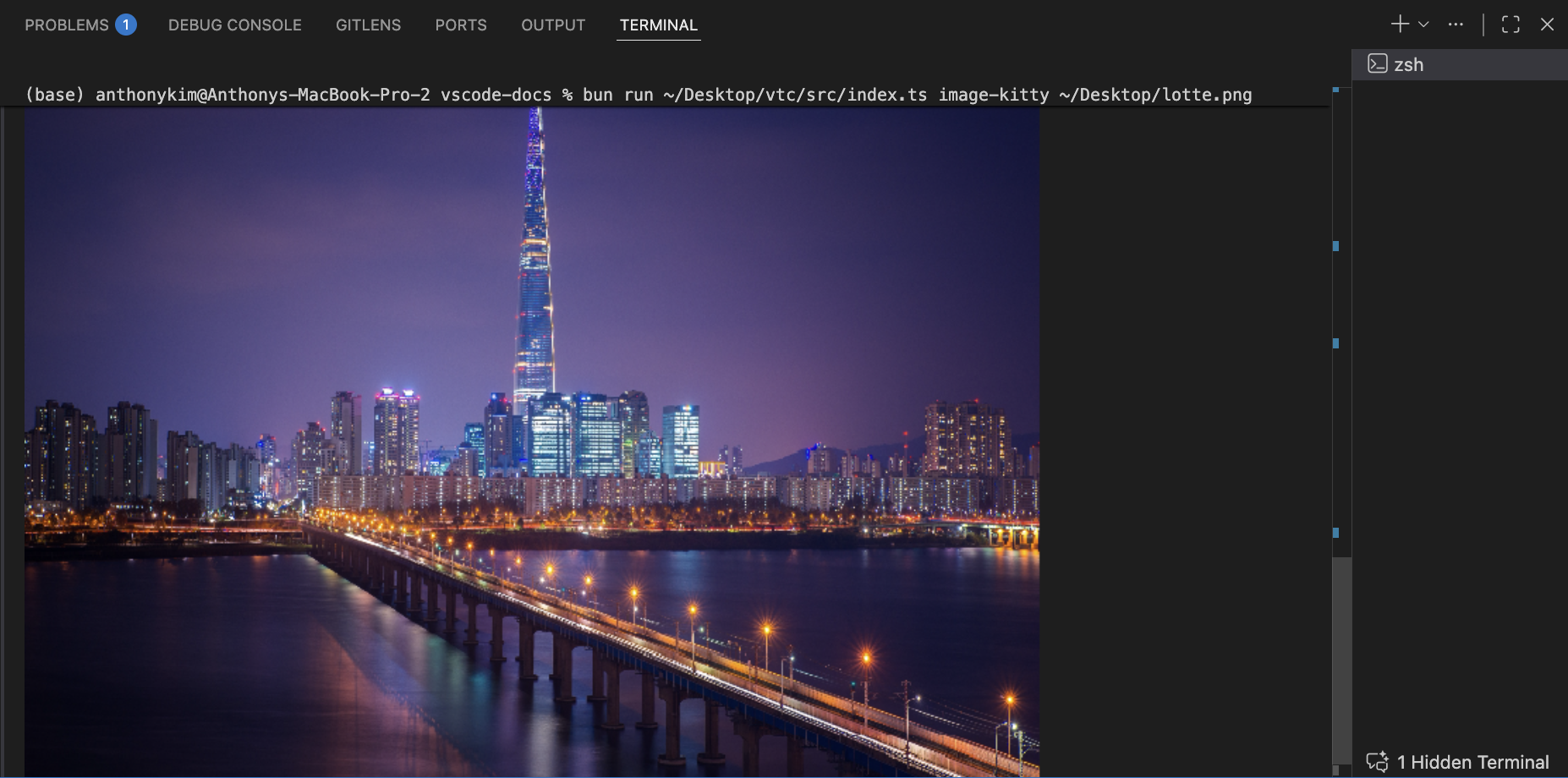
Note: Some Kitty graphics protocol features are not yet supported, including animations, relative placements, Unicode placeholders, and file-based transmission. See the xterm.js discussion for the most up-to-date implementation status.
Ghostty support for external terminal
Settings: terminal.external.osxExec , terminal.external.linuxExec
Ghostty is now supported as an external terminal on macOS and Linux. You can set it as your default external terminal using the terminal.external.osxExec setting on macOS or terminal.external.linuxExec on Linux:
// macOS
"terminal.external.osxExec": "Ghostty.app",

// Linux
"terminal.external.linuxExec": "ghostty"
Once configured, commands like Terminal: Open New External Terminal and debug configurations that launch in an external terminal will open in Ghostty.
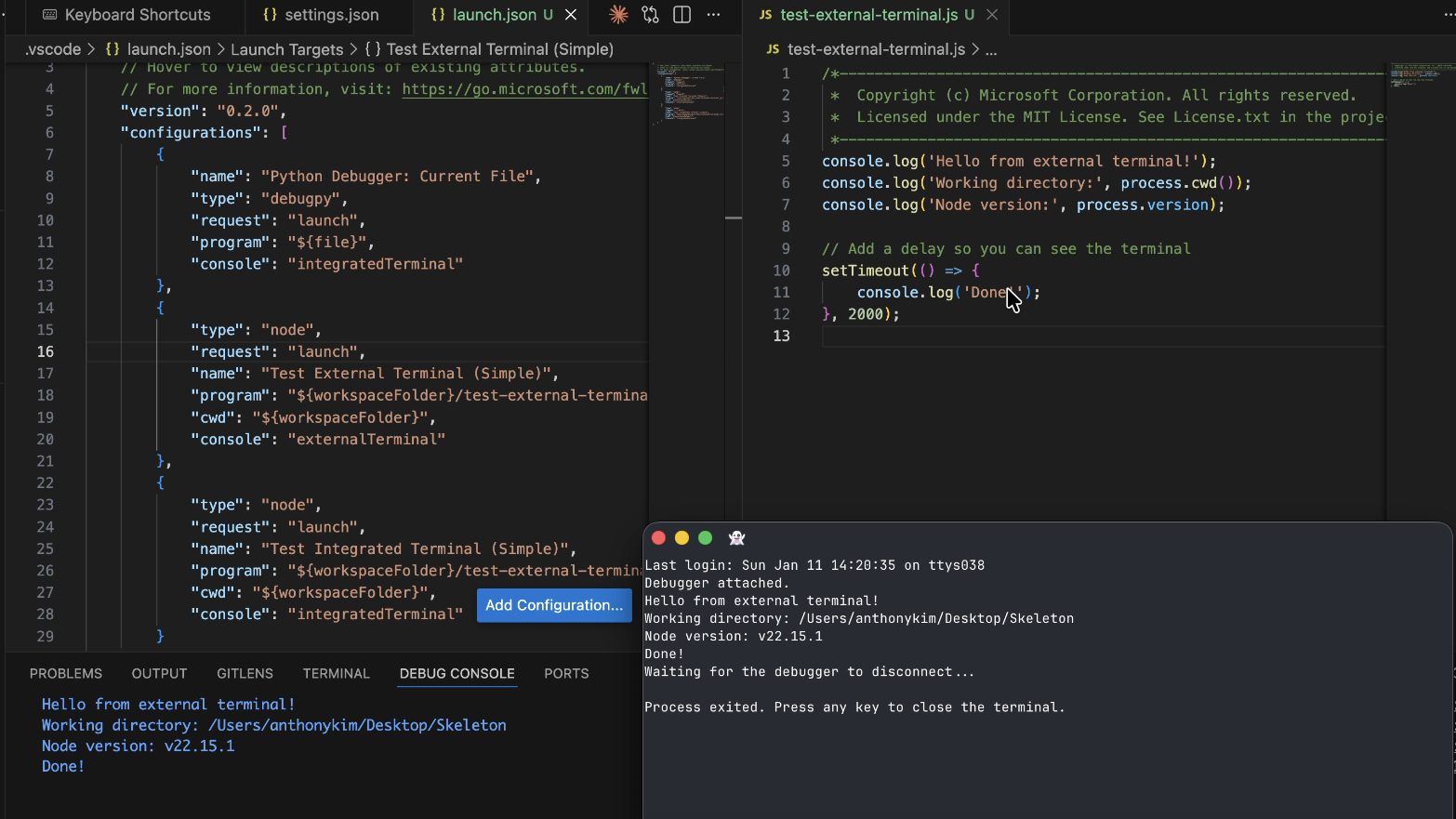
Workspace folder selection for external terminals
When you open an external terminal in a multi-root workspace using ⇧⌘C (Windows, Linux Ctrl+Shift+C) or the Terminal: Open New External Terminal command, VS Code now prompts you to select a workspace folder. The selected folder is used as the working directory for the external terminal.
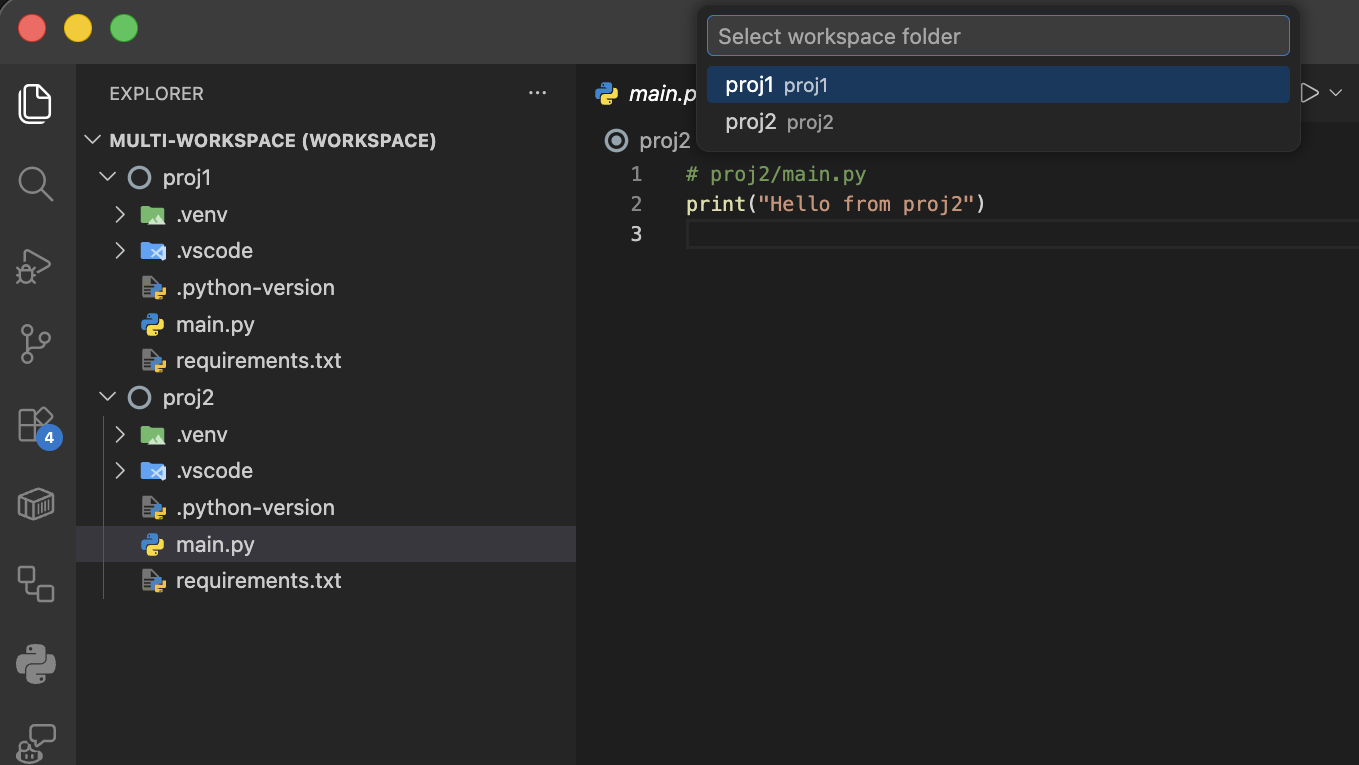
Terminal sandboxing improvements (Preview)
Settings: chat.tools.terminal.sandbox.enabled , chat.tools.terminal.sandbox.linuxFileSystem , chat.tools.terminal.sandbox.macFileSystem , chat.tools.terminal.sandbox.network
Trusted domains can now be selected for network isolation by enabling allowTrustedDomains in
chat.tools.terminal.sandbox.network
. Improved detection of restricted domains, with clear feedback indicating which domain is blocked.
No installation is required to enable terminal sandboxing on macOS, and on Linux you can enable without installing ripgrep.
Languages
Unified JavaScript and TypeScript settings
To prepare for the upcoming TypeScript 6.0 and 7.0 releases, we've consolidated and cleaned up our built-in JavaScript and TypeScript setting IDs. Previously many of these settings had duplicate javascript.* and typescript.* versions. This is because these settings are from before we added a standard approach to language-specific settings. Some of the settings names were also inconsistent.
Now all of these settings have been moved under the js/ts.* prefix. This means that by default you only need to update a single setting value to change the behavior in both JavaScript and TypeScript files. You can use language-specific settings if you want different behavior in JavaScript and TypeScript files.
For example, instead of setting:
"javascript.format.enable": false,
"typescript.format.enable": true
You can now use language-specific overrides with the unified setting:
"[javascript][javascriptreact]": {
    "js/ts.format.enabled": false
},
"[typescript][typescriptreact]": {
    "js/ts.format.enabled": true
}
You can also customize the settings for JSX files only by using [javascriptreact].
The old javascript.* and typescript.* settings continue to work but are now marked as deprecated and will be overridden if the new unified js/ts settings are set.
We understand this is a big change, however we think it's the right one for the long term quality of VS Code. The unified settings make it easier to change JavaScript and TypeScript settings, and also enable support for modern options such as language-specific settings.
Python
Python Environments extension rolling out to all users
The Python Environments extension is now rolling out to all users after a year in preview. The extension brings a unified interface for managing Python environments, packages, and interpreters directly in VS Code, regardless of whether you use venv, conda, pyenv, poetry, or pipenv.
Key capabilities include:
- Quick Create: Create an environment with a single click using your default manager and the latest Python version
- Python Projects: Assign environments to specific folders for monorepos and multi-service workspaces
- uv integration: Faster environment creation and package installation when uv is installed
- Built-in package management: Search, install, and uninstall packages from the Environment Managers view
- Portable settings: Environment configurations use manager types instead of hardcoded paths, making
settings.jsonportable across machines
You can expect the extension to be enabled automatically over the next few weeks, or you can opt in immediately with the python.useEnvsExtension setting.
For more details, read the announcement blog post or see the Python environments documentation.
Contributions to extensions
GitHub Pull Requests
There has been more progress on the GitHub Pull Requests extension, which enables you to work on, create, and manage pull requests and issues. New features include:
- Multiple pull request and issue descriptions can be open at once.
- The setting
githubPullRequests.autoRepositoryDetectioncan be set totrueto include repositories that are outside of the workspace. - Repositories without matching issues are now hidden in the Issues view.
Review the changelog for the 0.130.0 release of the extension to learn about everything in the release.
Extension Authoring
Webviews and Custom Editors can now use ThemeIcons for their icon path
Webview Panels and custom editors can now use a ThemeIcon as their editor tab icon:
webviewPanel.iconPath = new vscode.ThemeIcon('octoface');

Portable mode detection API finalized
The env.isAppPortable API is now stable and available to all extensions without requiring enabledApiProposals.
Use this API to detect whether VS Code is running in portable mode, which is enabled when the app runs from a folder containing a data directory.
if (vscode.env.isAppPortable) {
  // Running in portable mode - adjust behavior accordingly
}
Proposed APIs
Chat item controller API
We continued to improve the chat session API. This API lets extensions contribute items to VS Code's built-in chat sessions view. Notable changes this iteration include:
-
Added
ChatSessionItemControllerNewItemHandlerso that controllers can specify the URI used for new sessions. -
Added
ChatSessionProviderOptions.newSessionOptionswhich sets the default options for new sessions.
We also significantly optimized the API's implementation to support large numbers of sessions.
Engineering
TypeScript-Go for VS Code engineering
We've continued adopting TypeScript-Go (tsgo) for development work in the vscode repo.
As of this iteration, we default the vscode workspace to using TSGo for development. We've already noticed performance improvements from this, and it also helps us test TSGo's language tooling.
We now also use TypeScript-Go (tsgo) to compile VS Code's built-in extensions during development. As a result, each of our built-in extensions is now built and fully typechecked in under a second.
Extension bundling with esbuild
We've migrated most of our built-in extensions to use esbuild instead of webpack for bundling. Esbuild is used for both bundling the desktop and web versions of these extensions.
This migration has both simplified and sped up our builds. There are only a handful of extensions left to migrate and we hope to finish this work in March.
Deprecated features and settings
New deprecations in this release
- Edit Mode is officially deprecated as of VS Code version 1.110. Users can temporarily re-enable Edit Mode via VS Code setting chat.editMode.hidden . This setting will remain supported through version 1.126. Beginning with version 1.126, Edit Mode will be fully removed and can no longer be enabled via settings.
Upcoming deprecations
None
Notable fixes
- vscode#251722: Inline actions on extension provided tree-view items withing the visible scroll area even when
"workbench.list.horizontalScrolling": true
Thank you
Issue tracking
Contributions to our issue tracking:
- @gjsjohnmurray (John Murray)
- @RedCMD (RedCMD)
- @IllusionMH (Andrii Dieiev)
- @tamuratak (Takashi Tamura)
- @robotsnh (robotsnh)
Contributions to vscode:
- @a-stewart (Anthony Stewart): Fix bug where a format document command results in an unknown detailed reason PR #288934
- @accesswatch (Jeff Bishop)
- fix: improve QuickInput accessibility for screen readers PR #292339
- fix(accessibility): Add ARIA hints and fix spurious announcements in find widgets PR #292376
- feat(accessibility): Add Accessibility Help System for find/filter dialogs PR #292373
- @aturzone (ATUR): Fix/resource leak osreleaseinfo PR #293027
- @EmrecanKaracayir (Emrecan Karaçayır)
- Use inlineChat.border in terminal inline chat PR #293116
- Fixes inconsistent coloring for agent status badge PR #293224
- @erezak (Erez Korn): Restore Unified Quick Access Prefix Switching PR #292203
- @gjsjohnmurray (John Murray)
- Prevent symbol-* codicons from displaying colored on toolbars (fix #267766) PR #267787
- Normalize Windows drive letter when comparing cwd and userHome (fix #293049) PR #293065
- @hkleungai (Jimmy Leung): vscode-dts: Add LineCommentConfig interface & update lineComment PR #289457
- @jainampatel27 (Jainam Patel)
- fix: correct spelling mistakes in nls.localize strings in debug.ts PR #296730
- Fix spelling errors in nls.localize strings in extensions activation events PR #297378
- @JeffreyCA: Update Fig spec for Azure Developer CLI (azd) PR #292894
- @murataslan1 (Murat Aslan): feat(testing): show running badge on Activity Bar while tests are running PR #292257
- @n-gist (n-gist): fix diagnostics not being repushed from problem matcher to markerServ… PR #292109
- @na3shkw (Naoto Ishikawa): fix: cancel debug launch when ESC is pressed on input variable dialog PR #293837
- @prasanthpul (Prasanth Pulavarthi): A/B experiment: close button vs Skip for now on sign-in dialog PR #295867
- @RedCMD (RedCMD): fix: selection of string literals when string contains escape characters PR #295302
- @remcohaszing (Remco Haszing): Enable npm scripts PR #283432
- @renan-r-santos (Renan Santos): Fix remote terminal env var collection using wrong workspace scope PR #293628
- @sam-shubham (Sam Shubham): Right align actions tree view PR #295266
- @SimonSiefke (Simon Siefke): fix: memory leak in tunnel view PR #287142
- @SongXiaoXi (SXX): fix: stop unbounded websocket inflate-byte recording PR #293819
- @tamuratak (Takashi Tamura)
- Fix final answer detection in markdown rendering logic PR #293746
- chat: enhance final response rendering with pinning logic and repositioning PR #293597
- @Vedag812 (Vedant Agarwal): fix: add missing closing '>' in keybinding placeholder in accessible view navigation hint PR #295412
Contributions to vscode-copilot-chat:
- @24anisha (Anisha Agarwal)
- @aashna (Aashna Garg): Add Copilot auth token to router decision fetcher for CAPI proxy auth PR #3980
- @alexweininger (Alex Weininger)
- @ashatabak786: Add Frozen prompt for 0129 to Prompt A for VSC Chat model PR #3452
- @bharatvansh (Ayush Singh): feat: add /summarize command to agent mode PR #3352
- @bstee615 (Benjamin Steenhoek)
- @dennyac (Denny Abraham Cheriyan): Add vscodeRequestId to panel_request event PR #4007
- @devm33 (Devraj Mehta): Add VS Code clientName to Copilot SDK session PR #3449
- @FAStre: Include file path in image prompts PR #3790
- @IanMatthewHuff (Ian Huff): Add a maximum date of the comparison commit for the 1p repo telemetry info PR #3774
- @lsby: Fix tool calling detection and support for Ollama models PR #3566
- @MRayermannMSFT (Matthew Rayermann)
- Copilot CLI: Fix Initializing Connections PR #3618
- Copilot CLI: Pick From Sessions When Sending References PR #3619
- Copilot CLI: Close Diffs When Client Disconnects PR #3626
- Copilot CLI: Receive Session Name from CLI Over MCP Call PR #3638
- Copilot CLI: Send Selection via Command/Context Menu PR #3668
- @Sid200026 (Siddharth Singha Roy): chore(): add telemetry event for auto mode routing fallback PR #3780
- @spboyer (Shayne Boyer): feat: improve agent-customization skill — Medium → High compliance PR #3866
- @zelinms (Zeqi Lin): fix: correct telemetry response for Responses API output PR #3733
Contributions to vscode-css-languageservice:
- @Arecsu (Alejandro Romano): Fix
@scopeparsing to support selector lists PR #474 - @ej-shafran (ej shafran)
Contributions to vscode-js-debug:
Contributions to vscode-json-languageservice:
- @Legend-Master (Tony): Only escape to
when needed PR #309 - @nsajko (Neven Sajko): fix typo in
additionalPropertiesJSON Schema property description PR #310
Contributions to vscode-languageserver-node:
- @andrewbraxton (Andrew Braxton): Add capabilities for incomingCalls and outgoingCalls to metamodel PR #1720
Contributions to vscode-pull-request-github:
- @gvilums (Georgijs): Fix PR tree reveal errors for flat file layout PR #8522
Contributions to vscode-python-debugger:
- @renan-r-santos (Renan Santos): fix: use
run.executablefor interpreter identification instead ofactivatedRun.executablePR #949
Contributions to vscode-python-environments:
- @qq157755587 (Zhao Yuanjie): Fix defaultInterpreterPath variable expansion and stabilize interpreter selection tests PR #1234
- @StellaHuang95 (Stella Huang): Fix issue where terminal environment variables are not removed when they are commented out or deleted from .env files. PR #1131
Contributions to vscode-test:
- @DanTup (Danny Tuppeny): Allow custom stdout/stderr streams for test output PR #324
Contributions to debug-adapter-protocol:
- @Be-ing (Be): add Kate to implementors list PR #589
Contributions to language-server-protocol:
- @orien (Orien Madgwick): Add the Pony language server PR #2229
- @SeanDictionary (SeanDictionary): Add SageMath Language Server PR #2231
- @stefanvanburen (Stefan VanBuren): Add Buf Language Server PR #2225
We really appreciate people trying our new features as soon as they are ready, so check back here often and learn what's new.
If you'd like to read release notes for previous VS Code versions, go to Updates on code.visualstudio.com.