Over the last six months, we have run the same tiny eval more than 50,000 times. It gives the VS Code agent one instruction: write a string to a file. No large codebase to understand, no test suite to debug, no architectural decision to make. It is our smoke test, a quick way to confirm that the end-to-end model interaction still works.
A task this simple gives us an immediate read on the health of the system: how reliably the agent finishes the work and what kinds of failures show up in practice. We didn't intend it to be more than that. But at this scale, it became a surprisingly rich source of insight into how models approach even the simplest request.
In our previous post, we introduced VSC-Bench, the offline evaluation suite we use to measure agent behavior in VS Code. In this blog post, we look at how models solve a simple task and what it tells us about efficiency, model selection, and the value of small, stable evals.
The five-line eval
A simple task is valuable precisely because it removes variables. When the work is unambiguous and the correct answer is fixed, anything that changes between runs comes from the model or the system around it, not from the task itself. That makes a small eval a sensitive instrument: it reacts to harness regressions, infrastructure incidents, and differences in model behavior, without the noise of a complex problem to interpret.
The say_hello task we use for this is built around that idea. Every run starts in the same empty workspace, with the same tools and the same fixed prompt, using our VS Code agent harness. The task asks the agent to "Add HELLO to HELLO.txt" and checks two assertions: that the file exists and that it contains the expected content.
promptSteps:
  - text: Add HELLO to HELLO.txt.
    assertions:
        - check: file_exists("HELLO.txt")
        - check: file_contains("HELLO.txt", "HELLO")
Because say_hello runs as a smoke test before every benchmark suite, it quietly accumulated 50,974 runs across 30 models over six months. That volume turned a basic sanity check into a useful dataset on how differently models handle even the simplest work.
A developer doing this task would recognize that the workspace is empty, create HELLO.txt, and add the requested content. In the most direct VS Code agent path, this translates into a single create_file tool call with HELLO as the file content.
tool : create_file
args : {
  "filePath": "/path/to/workspace/HELLO.txt",
  "content": "HELLO"
}
The VS Code eval harness includes the workspace state in the initial prompt context. We assume that the model should not perform redundant existence checks.
How models solve say_hello
As expected, the say_hello task is easy enough that all models pass it most of the time. The interesting part is not whether they can do the work, but how they do it. Can the model recognize that this is a basic request that only requires a simple solution? Or does it still treat it like a complex problem that requires planning, exploration, and search?
To establish a baseline, we filtered for passing runs that used this one-tool-call path and looked at the lowest output-token counts in that group. Those runs averaged roughly 50 output tokens, including the tool-call structure. We then measured how often each model took that path.
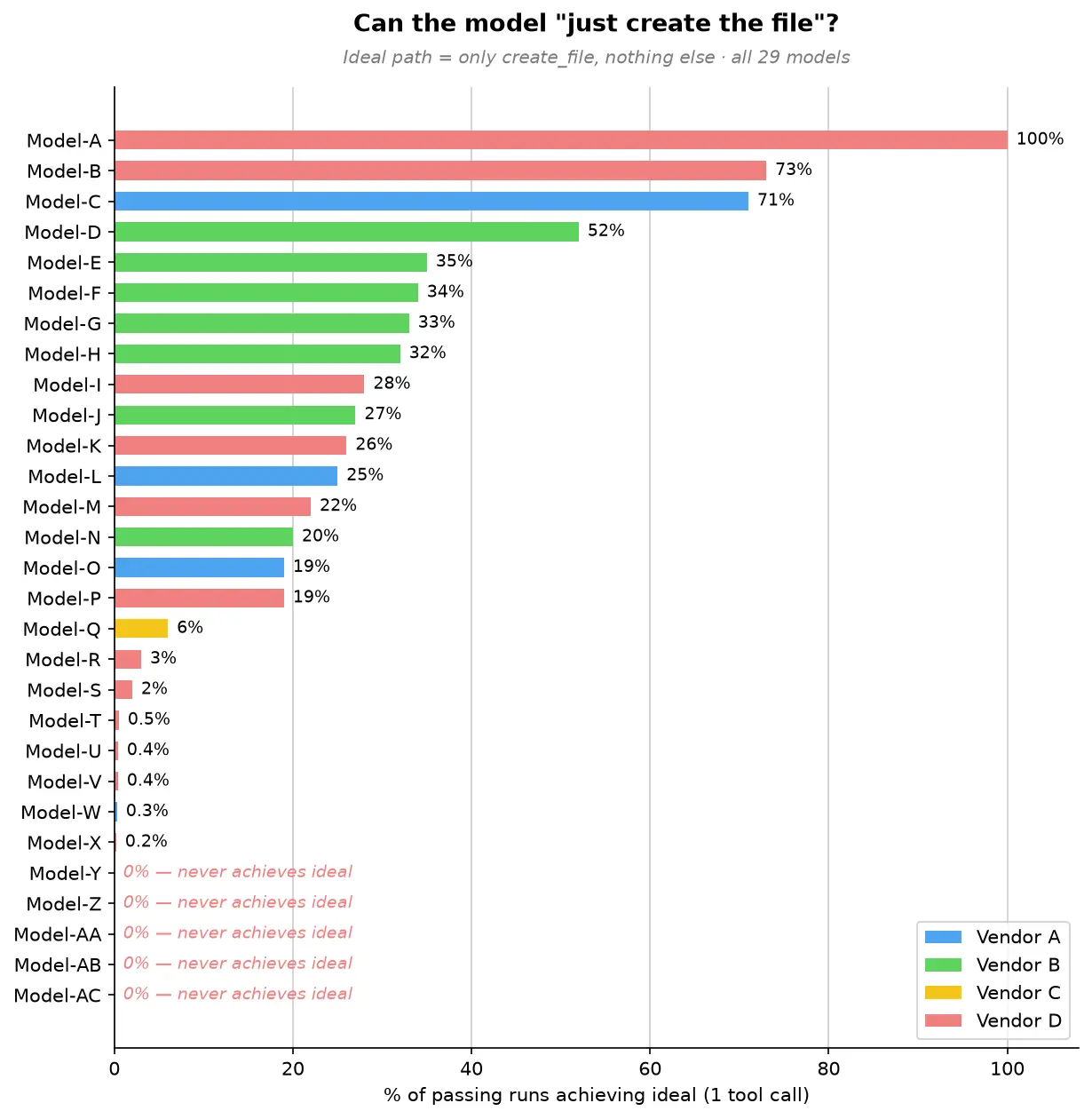
One model takes the direct path every time. The broader trend is what stands out: a few models often take the direct path, most do so only occasionally, and five never do.
At the top, Model-A stands alone. It goes straight to file creation in 100% of passing runs, using a single tool call every time. For this simple request, Model-A always creates the file directly without planning or exploring first. Model-B and Model-C follow at 73% and 71%, respectively.
The large middle cluster, Model-D through Model-P, takes the direct path somewhere between 19% and 52% of the time. These models can recognize a simple task, but not consistently. More often than not, they add a small step first, such as reading internal state or doing light workspace exploration, before creating the file.
Below them, Model-Q through Model-X rarely take the direct path, doing so in 0.2% to 6% of passing runs, with five models falling below 1%. For these models, extra work is the default. They almost always plan, explore, or search before producing the same five-character file.
At the bottom, five models, Model-Y through Model-AC, never take the direct path across thousands of passing runs. They always do something else first: plan, reach for a patch tool instead of simple file creation, search and plan, or narrate at length before creating the file. For them, even the simplest request triggers the full machinery of a complex one.
All models create the file with the right content, but they reach the same outcome with very different amounts of work. Even on a task with almost no ambiguity, some models still plan, search, or choose a more complex editing tool. They all pass the eval, but they do not use the same amount of effort to pass it.
How models spend their overhead
Because our offline eval harness captures the complete tool-call sequence, we can turn those traces into model behavior patterns. Across runs, models tend to spend their extra effort in a few familiar ways:
| Overhead pattern | Frequency | Representative models | What happens |
|---|---|---|---|
| Planning before acting | 52-99% | Model-AC, Model-Z, Model-S, 13 other models | Drafts a checklist or reads internal state before creating a 5-character file. Every one of the 16 models we could measure does this in at least half of its runs; Model-AC reaches 99% and Model-Z 96%. On one occasion, four planning steps in a single run for a one-step task. |
| Exploring an empty workspace | 56-96% | Model-T, Model-Q, Model-AA | Lists directories or searches for files in an empty workspace. Model-T lists the directory in 96% of runs; Model-AA both lists and searches in 56%, looking for clues in an empty room. |
| Narrating the reasoning | 1,441-3,676 tokens | Model-AB, Model-M, Model-U | Emits far more text than any tool call needs, walking through its reasoning and reconfirming the task. These three top the output-token chart at 29-74 times the realistic floor, even though the file itself is five characters. |
| Using the wrong tool for the job | About 95% | Model-AA | Uses a complex patch/edit tool (designed for modifying existing files) instead of simple file creation. Like using a CNC machine to cut a piece of paper. |
| Running a terminal command | 3-14% | Model-W, Model-Z, Model-V | Runs a terminal command (echo HELLO > HELLO.txt) when a simpler file-creation API is available. |
These are not correctness failures. They are signs that the model does not consistently recognize when the shortest path is enough. On longer tasks, planning and exploration can be valuable. On a one-step task, they add latency and cost without improving the result.
The cost of overthinking
Why should you care about how many extra steps a model takes to write a five-character file? Because those extra steps are not free and translate directly into output token usage, which has an actual cost.
For this simple task, about 50 output tokens is a realistic minimum. The following chart shows the range of output tokens used by different models. The selected models range from that minimum to thousands of tokens for the same five-character result!
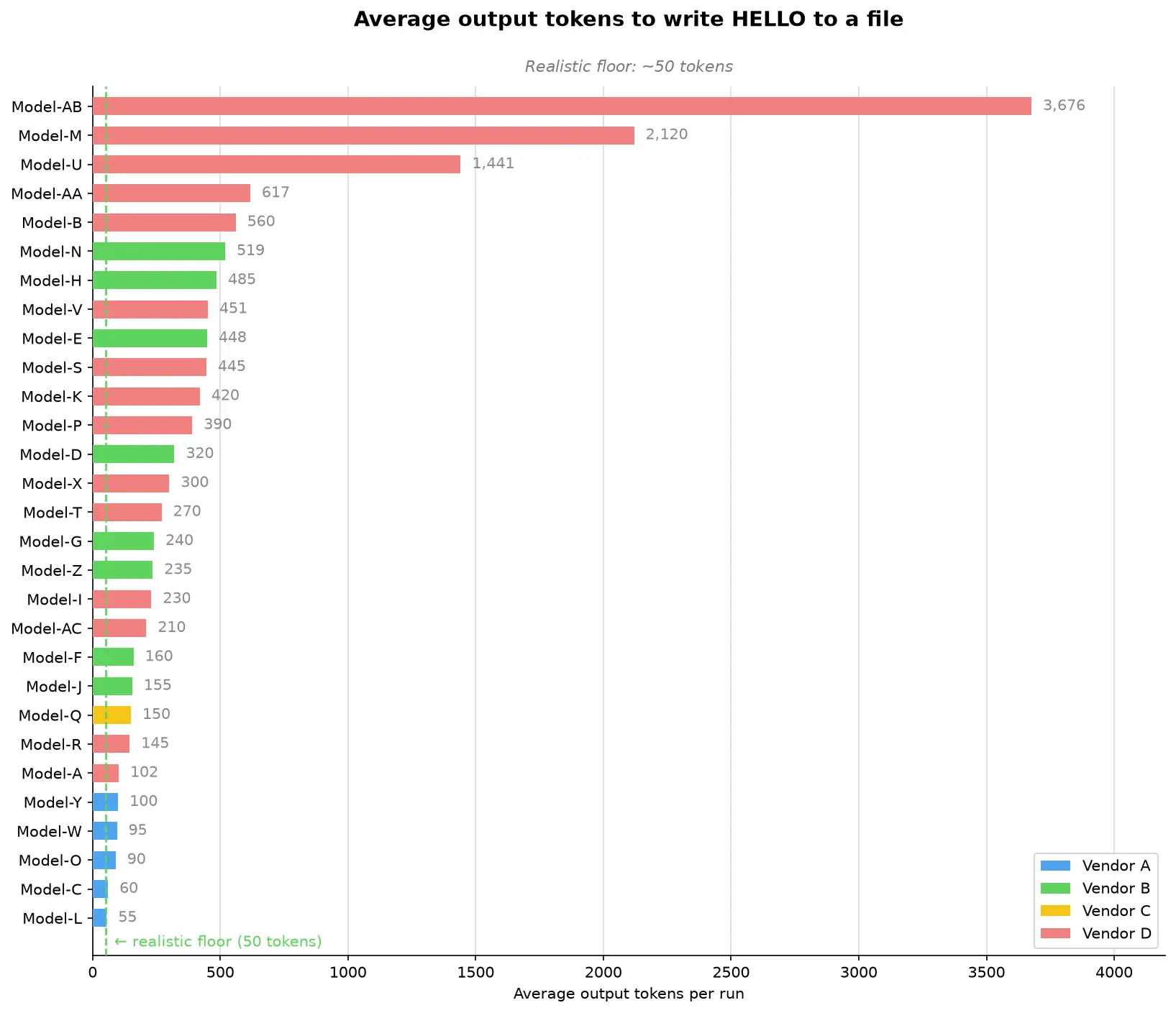
The chart falls into four clear bands. The extreme group includes Model-AB, Model-M, and Model-U, which average 3,676, 2,120, and 1,441 output tokens, respectively. That is 29 to 74 times more than the realistic minimum for the same five-character result. The high-overhead group, from 400 to 1,000 tokens, includes Model-AA, Model-B, Model-N, Model-H, Model-V, Model-E, Model-S, and Model-K. These models are not in the thousands, but they still spend roughly 8x to 12x the realistic minimum.
The moderate group, from 150 to 400 tokens, includes Model-P, Model-D, Model-X, Model-T, Model-G, Model-Z, Model-I, Model-AC, Model-F, Model-J, and Model-Q. They add overhead, but stay far closer to the task's natural size. The efficient group is below 150 tokens: Model-R, Model-A, Model-Y, Model-W, Model-O, Model-C, and Model-L. Model-L comes closest to our realistic minimum at 55 tokens, showing that a model can complete the task with very little extra narration even when it does not always take the direct tool path.
Choosing a model that overthinks less saves both time and money, but knowing which one is most efficient for a task usually means running your own benchmark. To take that burden off you, the VS Code and GitHub Copilot teams keep investing in optimizations and model routing. For example, automatic model selection lets VS Code pick the best model for your task.
Model size does not predict overhead
Our first hypothesis was that larger models overthink more, but our data contradicts this:
-
Model-F (a larger model) uses 160 output tokens on average and 2.1 tool calls. The most disciplined model in its family.
-
Model-H (a smaller model from the same family) uses 485 output tokens on average and 3.7 tool calls. More overhead than its larger sibling.
-
Model-AB (a "mini" model) is the single highest-overhead model at 3,676 output tokens on average. The smallest model in this sample does the most work.
Our read is that newer generations within each model family trend more disciplined, regardless of parameter count. This points to training maturity: how well a model scales its effort to the task in front of it. And that calibration isn't an academic curiosity. It shows up directly on the bill.
Where do we go from here?
We wanted to share a few key insights our team took from these runs, and a few learnings you might be able to apply to your own day-to-day flow.
The say_hello eval gives us great insights but it represents only one task. For harness optimization, we avoid optimizing too narrowly around a single task. We still run the full benchmark regularly across a diverse task set to validate whether changes improve our harness broadly.
Match the model to your task
With usage-based billing, output tokens represent both money and time. The difference between the leanest and heaviest model on this task is roughly 70× for identical output. The obvious lesson would be "don't reach for the biggest model to write HELLO." But that lesson is too blunt, and seeing why is the most useful thing say_hello taught us.
There is an important caveat to these results. say_hello is a short-horizon task with one step and one correct answer. On long-horizon work, planning, exploration, and reasoning can prevent expensive mistakes and improve the odds of finishing. The goal is not to eliminate planning. It is to understand whether a model can tell the difference between a one-step task and a 30-step task.
That is one reason why we think model selection should not become the developer's burden. Signals like effort calibration, token efficiency, and tool discipline can help automatic model routing pick the right model for the task at hand without asking developers to reason about every tradeoff.We continue to invest in and research automatic model selection in VS Code, so the product can make more of these choices for you over time.
Start small, measure well
Most teams do not start with a private offline benchmark suite they can run every day. Even a simple task, run consistently and logged well, can reveal useful changes in model or system behavior.
Start with the smallest task that has an unambiguous correct answer. Then run it constantly: use it as a preflight check before nightly evals, model onboarding, and infrastructure changes. The task does not need to be clever; it needs to be stable enough that changes in pass rate, latency, tool use, or failure mode mean something.
The important part is to capture enough structure to explain what changed. Record the tool-call sequence, not just the count. Knowing there were 4 tool calls is useful, but incomplete. Knowing that the model planned, explored, searched, and then created the file tells you where the overhead came from and why the run cost more.
// What most harnesses log:
{ "tool_calls": 4, "pass": true }

// What you actually need:
{
  "tool_sequence": ["plan", "list_directory", "search_files", "create_file"],
  "output_tokens": 617,
  "pass": true
}
From smoke test to signal
The surprising part of say_hello was not that models could write HELLO.txt. It was that a five-character edit made effort visible: which models scaled down, which kept planning or searching, and which system failures only appeared after thousands of runs.
Try the same request with your preferred model in VS Code, inspect its tool calls in the Chat Debug View, and consider what your own smallest useful task might be. Share what you find in the VS Code repository.
Happy coding! 💙