December 2025 (version 1.108)
Release date: January 08, 2026
Update 1.108.1: The update addresses these issues
Update 1.108.2: The update addresses these issues
Downloads for 1.108.2
Welcome to the December 2025 release of Visual Studio Code.
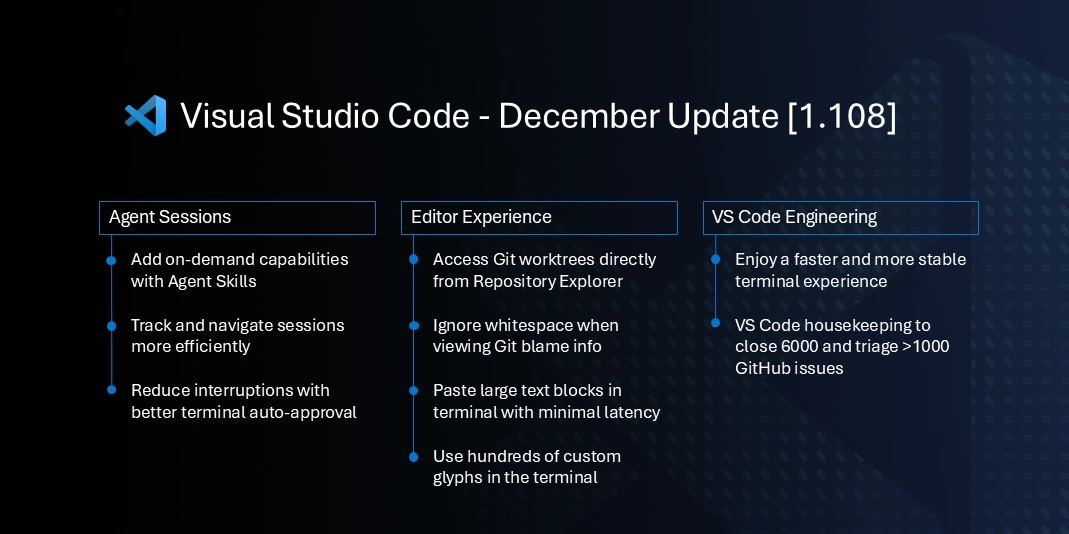
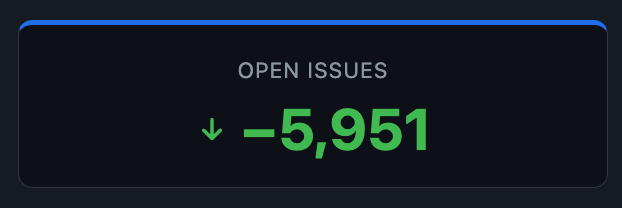
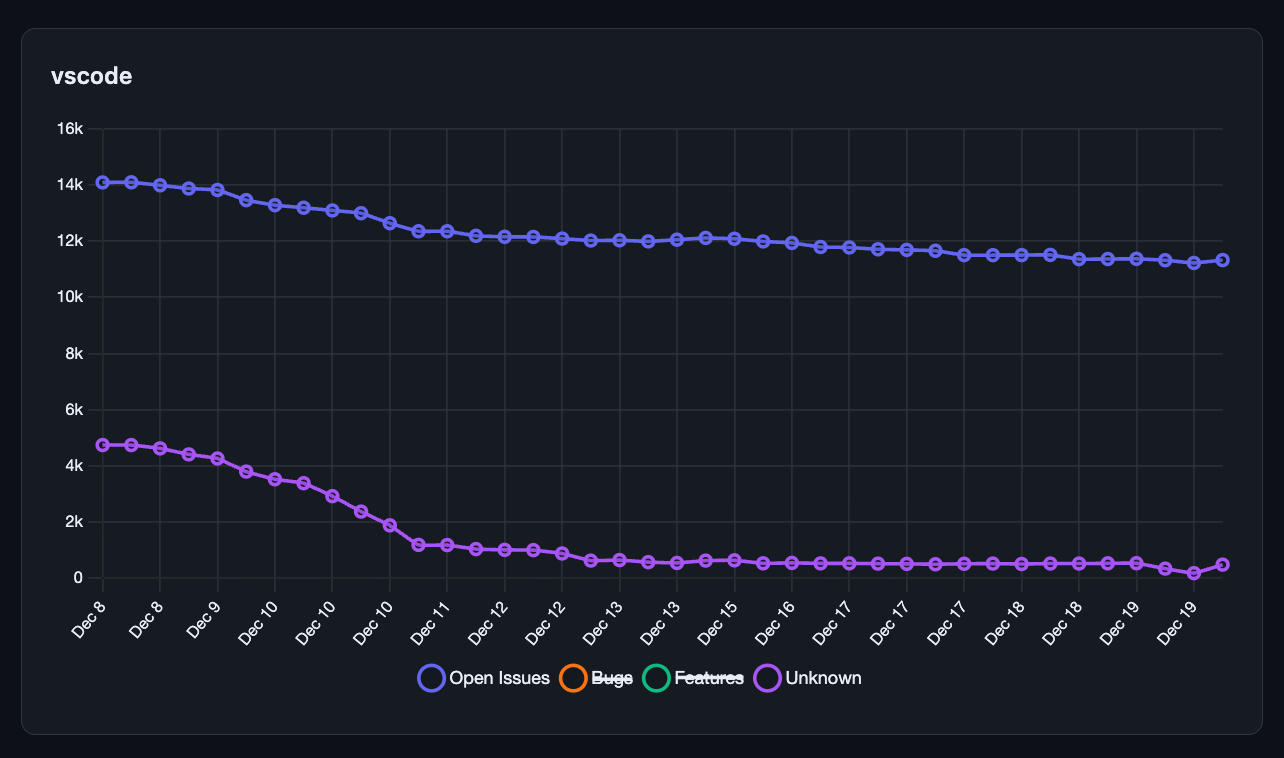
Traditionally, the month of December is a time where our team focuses on cleaning up GitHub issues and pull requests across our repositories. This year, we managed to reduce our open issues by nearly 6,000 and triaged over a thousand more.
In addition to our housekeeping efforts, we have also made several improvements and feature updates across various areas of VS Code.
Happy Coding!
If you'd like to read these release notes online, go to Updates on code.visualstudio.com.
Insiders: Want to try new features as soon as possible?
You can download the nightly Insiders build and try the latest updates as soon as they are available.
Download Insiders
Agents
Agent Skills (Experimental)
Setting: chat.useAgentSkills
VS Code now supports Agent Skills, allowing you to teach the coding agent new capabilities and provide domain-specific knowledge. Agent Skills are folders of instructions, scripts, and resources that GitHub Copilot can load when relevant to perform specialized tasks.
Skills are stored in directories with a SKILL.md file that defines the skill's behavior. VS Code automatically detects skills from the .github/skills folder in your workspace (or .claude/skills/ for backwards compatibility). They are then loaded on-demand into the chat context when relevant for your request.
Enable support for Agent Skills by enabling the chat.useAgentSkills setting.
Learn more about creating and using skills in the Agent Skills documentation.
Improvements to Agent Sessions view
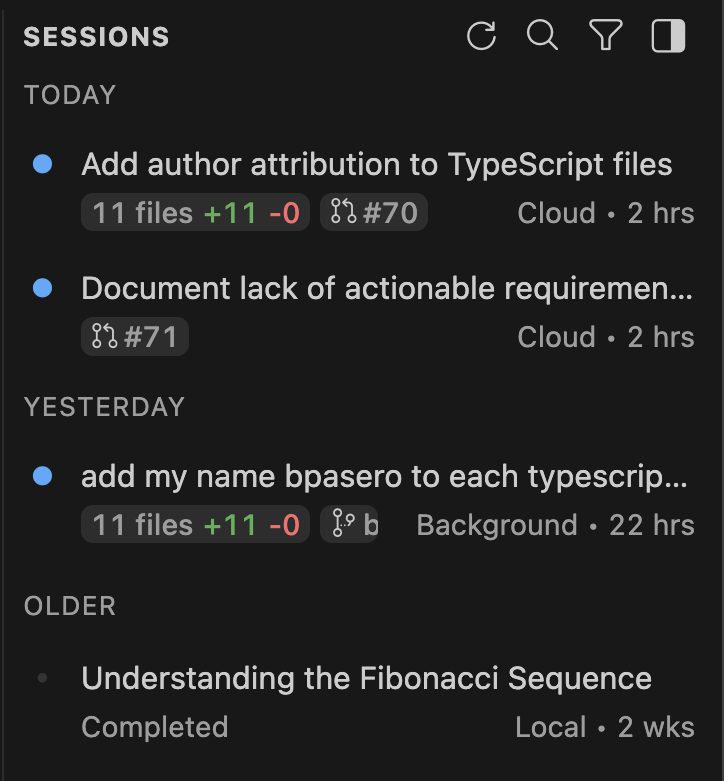
This iteration, we further improved the Agent Sessions view with several enhancements:
- Keyboard access support for actions such as archive, read state, opening a session
- Grouping of sessions based on state and age when showing side-by-side
- Provide information on changed files and associated PRs for a session
- Support for archiving multiple sessions at once from the new group sections
- General accessibility improvements
Note: chat.viewSessions.orientation no longer provides the
autooption. UsesideBySideas alternative.
Chat
Chat picker is based on agent sessions
The Quick Pick for chat sessions is now based on the same information that drives the Agent Sessions view. You can access any previous chat session from there and perform actions like archiving, renaming or deletion.
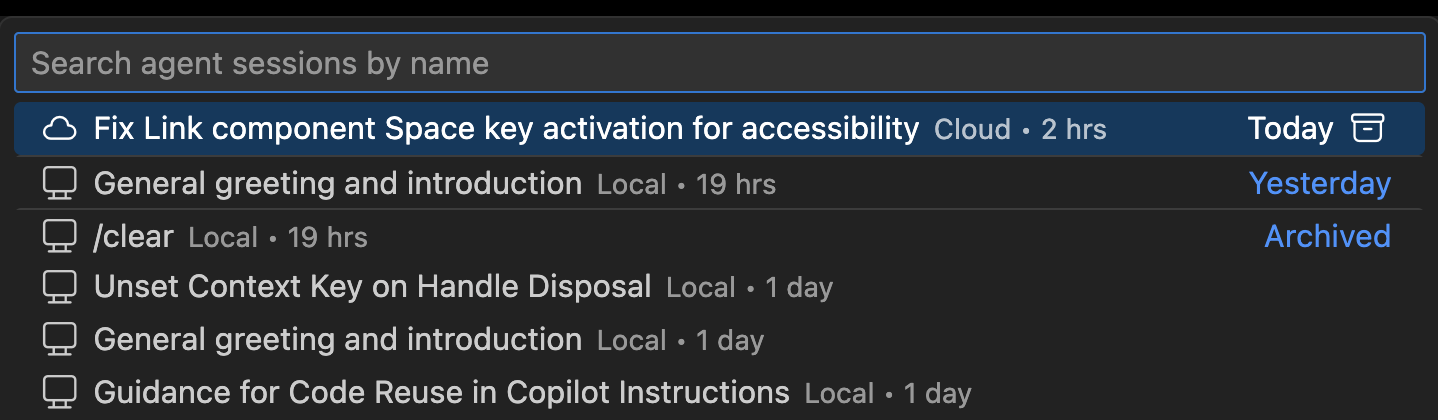
Note: Agent sessions can also be accessed by typing
agentin the Quick Open control (⌘P (Windows, Linux Ctrl+P)).
Chat title improvements
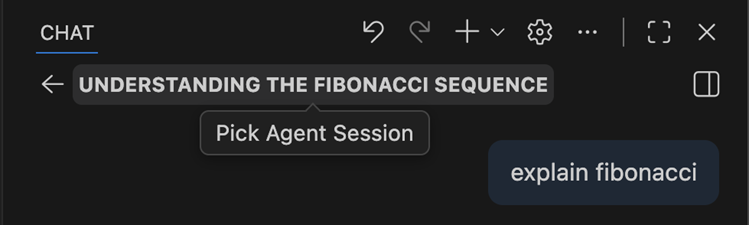
The Chat view title control is now showing up, irrespective of how the Activity Bar is configured. Previously, it only showed up in the default Activity Bar configuration.
To quickly jump from one session to another, select the chat title to open the sessions Quick Pick and choose another session.
Open empty Chat on restart
Setting: chat.restoreLastPanelSession
From now on, previous chat sessions are not automatically restored when VS Code is restarted. Instead, an empty Chat view is shown where you can then access previous sessions from the Agent Sessions control.
Modify this behavior with the chat.restoreLastPanelSession setting.
Terminal tool auto approve default rules
Settings: chat.tools.terminal.enableAutoApprove , chat.tools.terminal.autoApproveWorkspaceNpmScripts
The following commands are now auto approved by default when terminal auto approve is enabled ( chat.tools.terminal.enableAutoApprove ):
git ls-filesgit --no-pager <safe_subcommand>git -C <dir> <safe_subcommand>rg(excluding--preand--hostname-bin)sed(excluding some args and usage patterns)Out-String
In addition, npm scripts run through npm, pnpm or yarn are now auto approved by default when they are included within the package.json. We do this because using agents already requires Workspace Trust, and we protect agents from editing sensitive files like package.json. This can be disabled with
chat.tools.terminal.autoApproveWorkspaceNpmScripts
.
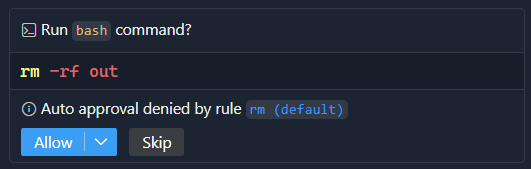
To improve transparency around auto approve, there is now an informational message when a rule was explicitly denied by either default or custom rules:
Add session and workspace rules for future terminal tool commands
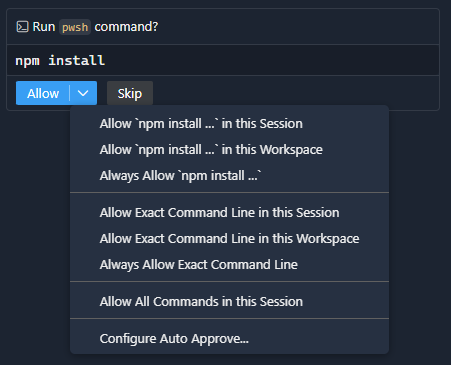
The allowed commands or command line entries in the Allow dropdown now have options a corresponding action to allow them for the current session or for the workspace.
Terminal tool preventing adding to shell history
Setting: chat.tools.terminal.preventShellHistory
When shell integration is enabled and working, commands that are run by the terminal tool are no longer included in shell history for bash, zsh, pwsh and fish. The method this uses differs for each shell, for bash for example HISTCONTROL=ignorespace is set and a space is added to the start of the command being run.
If you prefer to keep terminal tool commands in the shell history, configure this with the chat.tools.terminal.preventShellHistory setting.
Accessibility
Streaming chat responses in Accessible View
The Accessible View now dynamically streams chat responses as they are generated. Previously, you needed to close and reopen the Accessible View to see updated content. Now, you can stay in the Accessible View and monitor output as it comes in, making it much easier to follow along with AI responses in real-time.
MCP server output excluded from Accessible View
To reduce noise, MCP (Model Context Protocol) server output is now excluded from the Accessible View by default. The standard chat output remains fully accessible, as it's presented in a text area that works well with screen readers.
Language ID variable in window title
A new ${activeEditorLanguageId} variable is now available for the
window.title
setting. This variable displays the language identifier of the currently active editor, which is useful for accessibility tools like Talon that need to determine the current programming language to enable appropriate voice commands.
"window.title": "${activeEditorLanguageId} - ${activeEditorShort}"
Editor Experience
Import profile by drag and drop
You can now import a settings profile by dragging and dropping a .code-profile file into VS Code. This makes it easier to share profiles with teammates or quickly set up a new environment.
When you drop the file, the Profiles editor opens and lets you preview and import the profile. This provides a similar experience to dragging and dropping a .code-workspace file to open a workspace.
Copy breadcrumbs path
Setting: breadcrumbs.symbolPathSeparator
You can now copy the breadcrumbs path to the clipboard by using the Copy Breadcrumbs Path command. This is useful when you need to share the exact location of a symbol with your team or for documentation purposes.
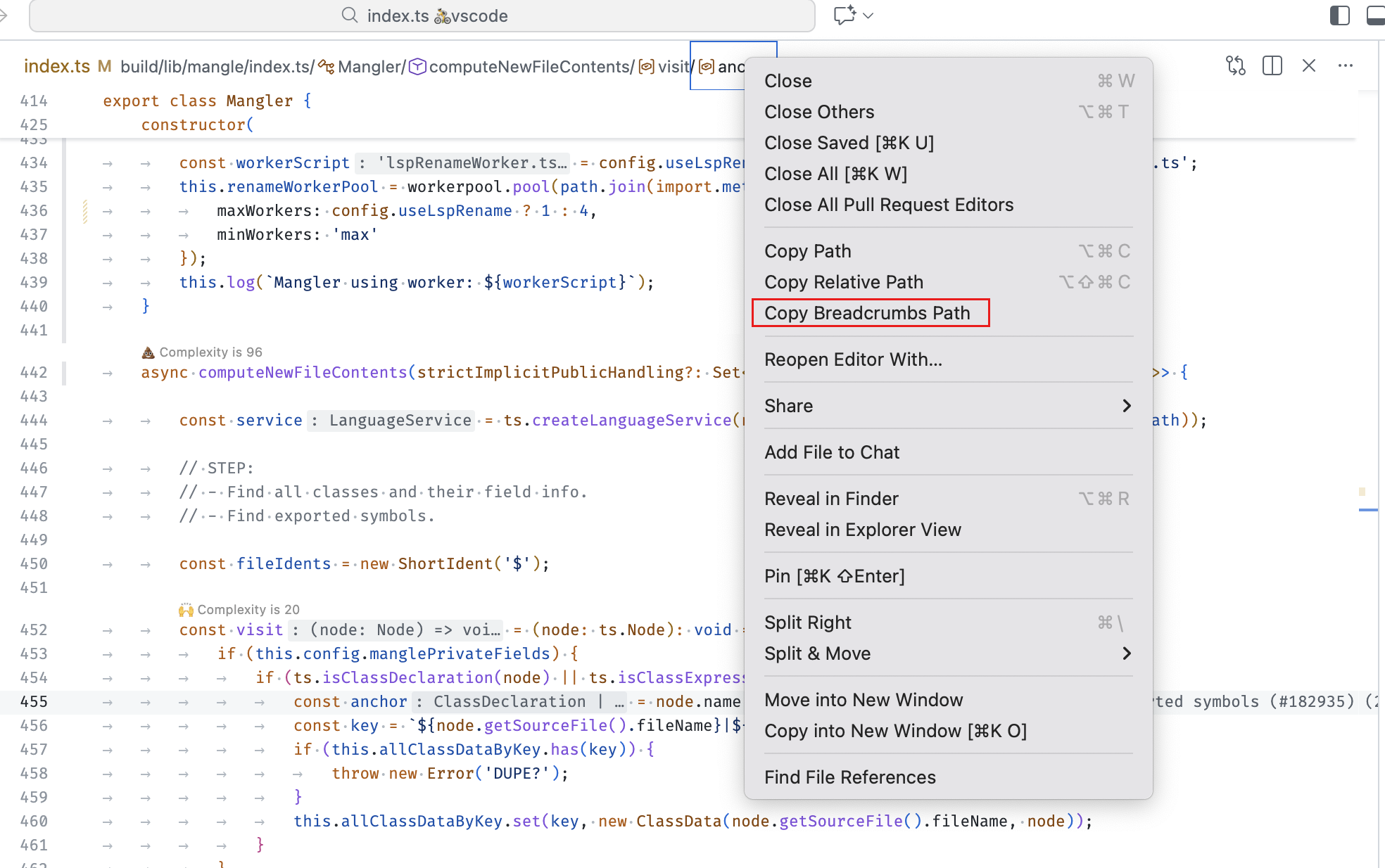
The breadcrumbs.symbolPathSeparator setting enables you to customize the separator character used to join breadcrumb segments.
Go to Symbol in Workspace supports special characters in query
The Go to Symbol in Workspace (⌘T (Windows, Linux Ctrl+T)) feature no longer incorrectly filters out all results when the search query contains a # character.
This fix enables language extensions like rust-analyzer to use # as a modifier in symbol searches. For example, in rust-analyzer, appending # to a query like main# searches for functions in current workspace only.
Code Editing
New snippet transformations
There are two new snippet transformations available: snakecase and kebabcase. This is how you can use them:
For snake_case transformation:
${TM_FILENAME/(.*)/${1:/snakecase}/}
This transforms the filename to snake-case format. For example, from MyFileName.txt it makes my_file_name.txt. The kebab-case transformation would be my-file-name.txt.
Source Control
Git blame information settings
Settings: git.blame.ignoreWhitespace , git.blame.editorDecoration.disableHover
The new git.blame.ignoreWhitespace setting enables you to configure Git blame to ignore whitespace changes when determining which commit last modified a line. This is particularly useful when working with code that has been reformatted, as it helps you identify the commit that made the actual functional change rather than just whitespace adjustments.
Additionally, the git.blame.editorDecoration.disableHover setting lets you disable the hover tooltip that appears when you hover over a Git blame editor decoration. This can be useful if you prefer a cleaner editing experience and only want to see the inline blame annotations without the additional hover information.
Authoring commit messages using the editor
Some time ago we added the capability to use the full editor to author a commit message but the actions to commit or cancel were difficult to discover in the editor title toolbar. We improved the editor overlay control in the lower right-hand corner of the editor and moved these actions there to make them easier to use.
Worktrees in the Source Control Repositories view (Experimental)
Settings: scm.repositories.explorer , scm.repositories.selectionMode
This milestone, we have added a Worktrees node to the Source Control Repositories view. Under this node, you can see the list of the repository worktrees with an inline action to open the worktree in a new window. The context menu also contains an action to open the worktree in the current window, as well as an action to delete the worktree.
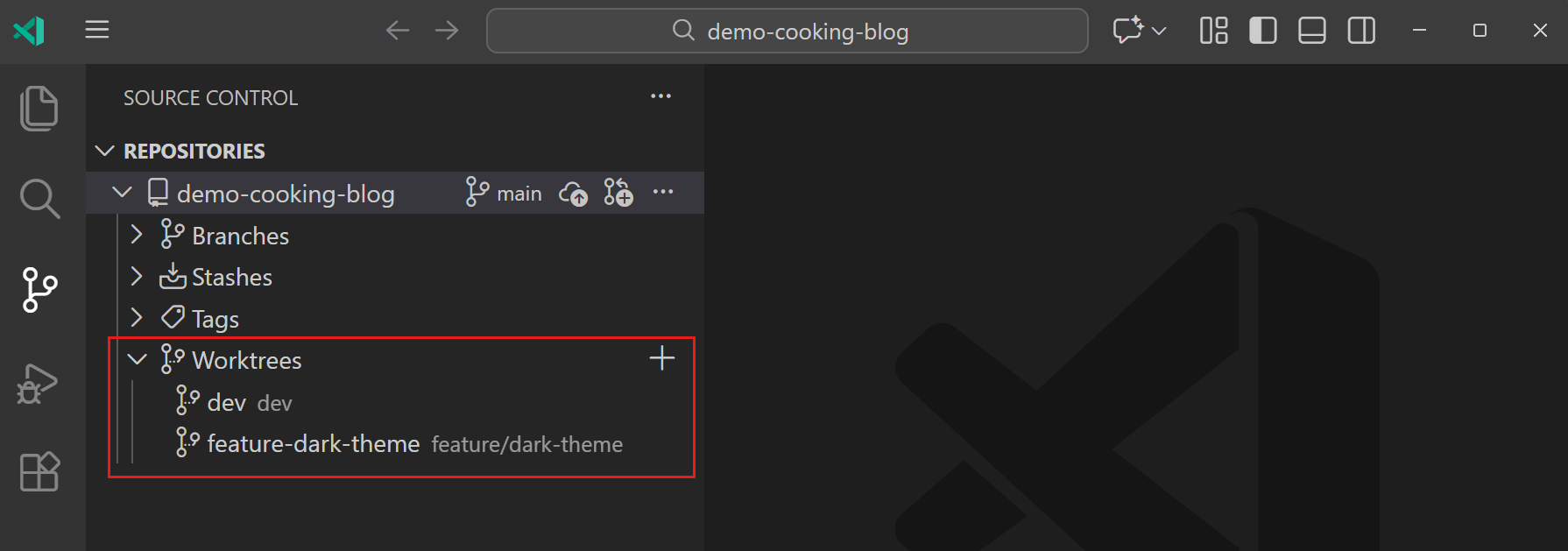
You can enable the experimental repository explorer by setting the scm.repositories.selectionMode and scm.repositories.explorer settings. Give it a try and let us know what other repository artifacts you would like to see in the Repositories explorer.
Learn more about using source control in VS Code.
Terminal
Terminal IntelliSense default UX rework
During the past two releases, we rolled out terminal IntelliSense to all VS Code Stable users. While much of the feedback was positive, there was a segment of users (mostly terminal power users) that did not like the feature breaking their muscle memory. After a lot of discussion, we decided to switch some defaults, improve discoverability and allow easier inline configuration of the feature.
The feature itself is still enabled by default, but instead of showing the control automatically when typing (quick suggestions and suggest on trigger characters), it now needs to be explicitly triggered via Ctrl+Space.
We also improved the "status bar" on the bottom. Previously, it showed insert on the left and Learn more/Configure on the right with their associated keybindings. We got feedback that it's not clear that these can be interacted with, so we now show icons on the right and no longer show the keybindings. The left action now allows rotating through the options for "selection mode", which determines how Tab and Enter react when it's brought up. There's a new eye icon on the right, which enables quick suggestions and suggest on trigger characters again.
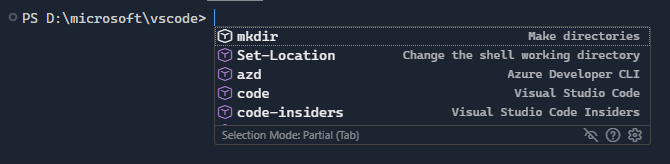
Finally, to still make this powerful feature relatively discoverable without being overbearing, a hint shows when opening a terminal that explains how to show suggestions. The lifecycle of the hint is simplified and it's as easy as clicking "don't show" to get rid of it permanently, just like the similar feature in the editor.

Beyond this UX rework, these improvements were also done to terminal IntelliSense:
- We now show files with the executable bit on macOS/Linux
- Improved completions for
npmandgit - Improved validation of file and folder suggestions
- Constrained the height of suggestion details to prevent layout overflow
- Ensured suggestions continue to work correctly when the terminal view is moved or relocated
Performance and stability improvements
The terminal saw several important performance and stability improvements this release:
- node-pty#831: On macOS and Linux, pasting more than 50 characters at once or having Copilot run a large command is no longer throttled and should apply essentially instantly, scaling similarly to other terminals with KBs/MBs of data. This also fixed a crash that could happen on macOS when doing the same thing.
- vscode#285031, vscode#285032, xterm.js#5548: Fixed several layout thrashing issues that could cause the editor to get laggy.
- vscode#239541: Fixed a crash that could occur when fonts such as CommitMono were configured in the terminal.
More comprehensive custom glyphs
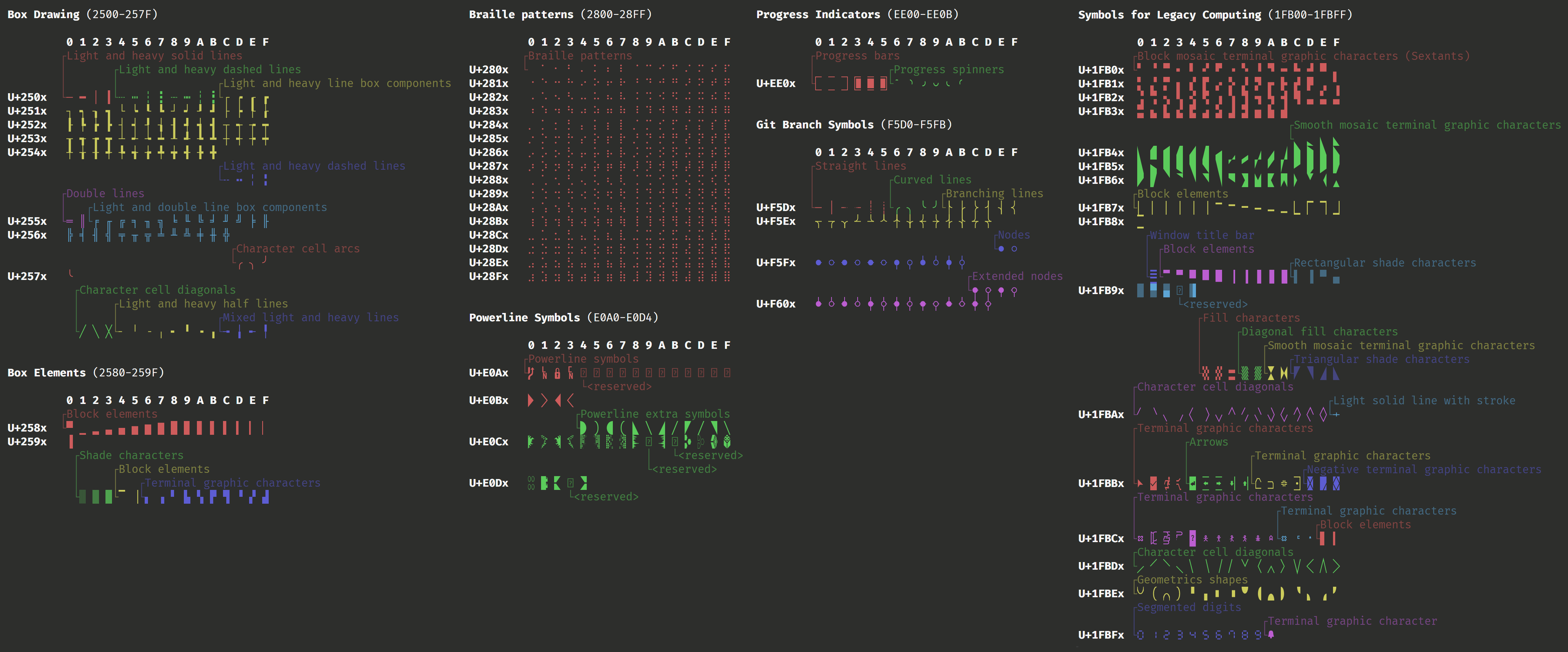
The terminal's GPU accelerated renderer (on by default) has supported custom glyphs for some time for box drawing, block element, and a subset of powerline symbols. This means that you can see these characters without needing to configure a font and they also scale with line height, letter spacing, and should align with each other perfectly.
In this release, we expanded the number of characters supported to almost 800 by including the majority of custom glyphs supported by any other terminal. This includes ranges that are generally useful in a terminal, specifically these ranges:
- Box Drawing (
U+2500-U+257F) - Block Elements (
U+2580-U+259F) - Braille Patterns (
U+2800-U+28FF) - Powerline Symbols (
U+E0A0-U+E0D4, Private Use Area) - Progress Indicators (
U+EE00-U+EE0B, Private Use Area) - Git Branch Symbols (
U+F5D0-U+F60D, Private Use Area) - Symbols for Legacy Computing (
U+1FB00-U+1FBFF)
Here's a visual of the complete set of glyphs:
Improved rendering of curly underlines
VS Code has been able to parse and display colored and styled underlines for some time now, but the curly underline's rendering always left something to be desired. The curly underlines should now look very close to how they look in the editor.
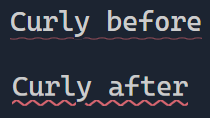
You can try this out for yourself by running this command in bash: echo -e '\x1b[4:3mCurly\x1b[0m \x1b[4:3m\x1b[58;5;1mRed\x1b[0m'
Dimensions visual overlay on resize
Inspired by a feature in ghostty, we added a brief overlay that shows the current terminal dimensions (columns x rows) when you resize the terminal. This is useful if you want to resize your terminal to a specific size for testing or other purposes.

New VT features
The terminal now supports the follow VT features/sequences:
-
Synchronized output: can be used by applications to pause rendering and batch updates in the terminal, which is particularly useful to prevent tearing when rewriting the buffer.
- DECRQM (
CSI ? 2026 $ p) - BSU (
CSI ? 2026 h) - ESU (
CSI ? 2026 l)
- DECRQM (
-
XTVERSION (
CSI > 0 q): allows applications to query details about the terminal, the response VS Code will give currently is the "xterm.js" and its version
Debug
Organize breakpoints by file
Setting: debug.breakpointsView.presentation
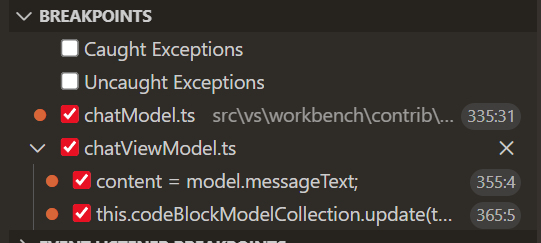
Breakpoints can now be shown as a tree, grouped by their file. Enable this by setting
debug.breakpointsView.presentation
to tree.
Testing
Navigate to uncovered regions
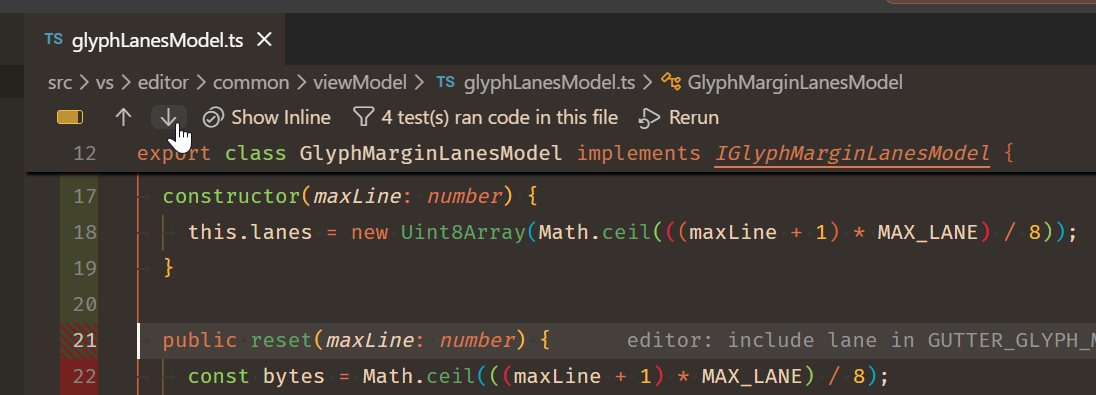
We've added navigation buttons to the test coverage toolbar that allow you to easily jump between regions of uncovered code. You can toggle the test coverage toolbar using the Test: Show Coverage Toolbar command in the Command Palette.
Contributions to extensions
GitHub Pull Requests
There has been more progress on the GitHub Pull Requests extension, which enables you to work on, create, and manage pull requests and issues. New features include:
- Change a pull request's base branch from the pull request description webview.
- Convert open pull requests to draft from the pull request description webview.
- Generate a pull request description for an existing PR, not just new ones.
Review the changelog for the 0.126.0 release of the extension to learn about everything in the release.
Extension Authoring
New Quick Pick properties for prompts and resource URIs
The Quick Pick API includes two new properties for creating interactive selection interfaces.
Use the prompt property on QuickPick to display persistent instructional text beneath the input box. The text remains visible while users type, which helps provide guidance or context.
const quickPick = vscode.window.createQuickPick();
quickPick.prompt = 'Select a file to open';
quickPick.items = items;
quickPick.show();
Use the resourceUri property on QuickPickItem to automatically derive item properties from a resource URI. When provided, VS Code derives:
- The
labelfrom the file name (when set to an empty string) - The
descriptionfrom the file path (when set toundefinedor an empty string) - The
iconfrom the current file icon theme (wheniconPathis set toThemeIcon.FileorThemeIcon.Folder)
This is useful when building file or folder selection interfaces.
const items: vscode.QuickPickItem[] = [
  {
    label: '',
    resourceUri: vscode.Uri.file('/path/to/app.ts'),
    iconPath: vscode.ThemeIcon.File
  },
  {
    label: '',
    resourceUri: vscode.Uri.file('/path/to/src'),
    iconPath: vscode.ThemeIcon.Folder
  }
];
Engineering
Housekeeping
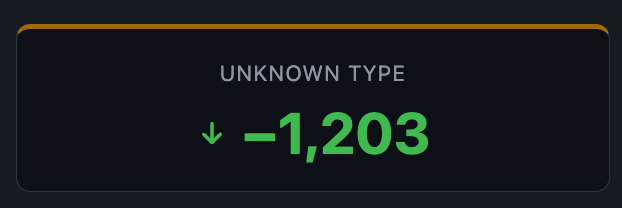
As part of our annual December housekeeping, we spent a majority of time cleaning up GitHub issues and pull requests across all our maintained repositories. This year, we managed to reduce our open issues by 5,951 and triaged another 1,203 issues.
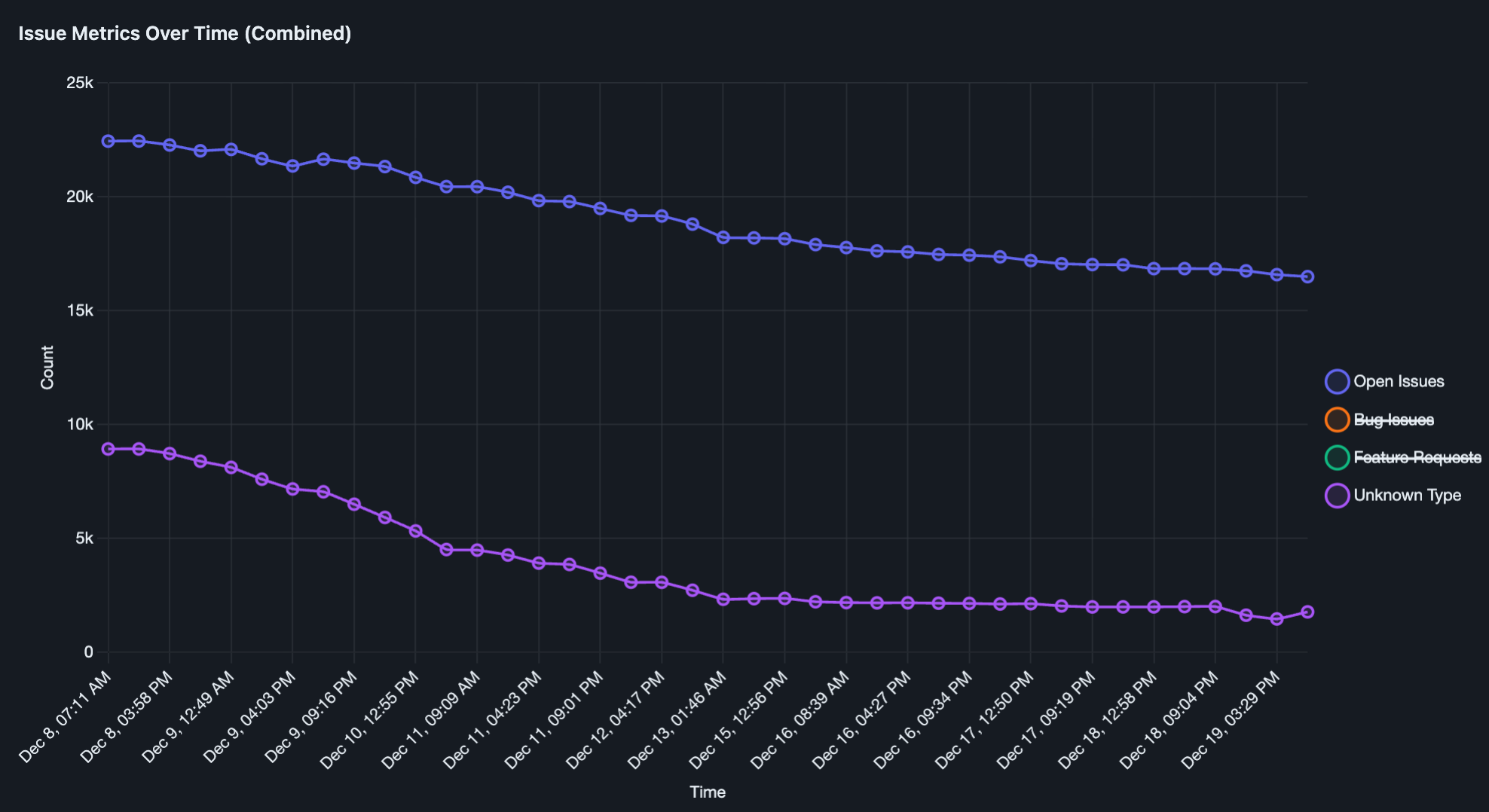
By using improved triage tooling and deduplication processes, we were able to close a significant number of stale and resolved issues. This has left us with a more manageable project, enabling us to move forward and develop the features that have the most impact for our users. In our core VS Code repository alone, we closed 2,872 issues and triaged another 1,697!
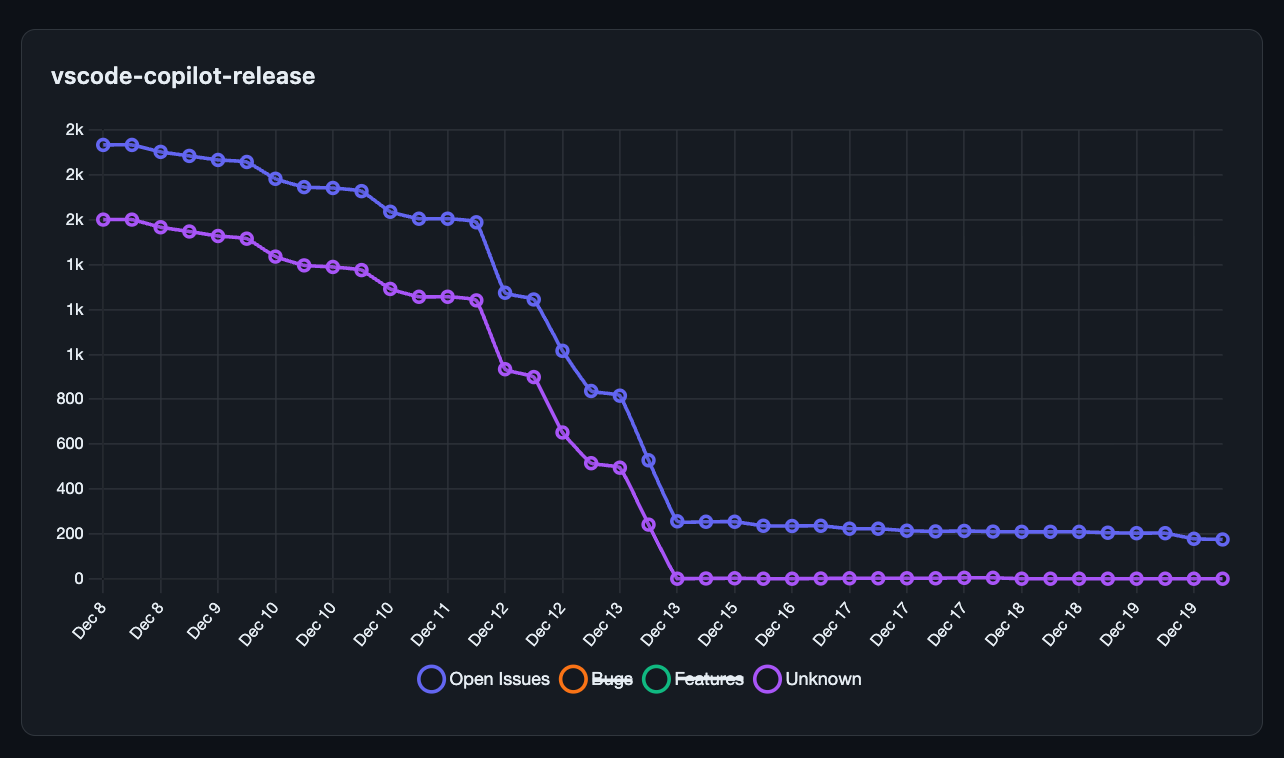
In June of 2025, we also announced that Copilot had become Open Source! This meant that all related issues would also be filed in the microsoft/vscode repo, and that we had a backlog of issues remaining in microsoft/vscode-copilot-release to take care of. This month, we triaged every issue in the repository and closed 1,659 issues, leaving only 175 open to be migrated.
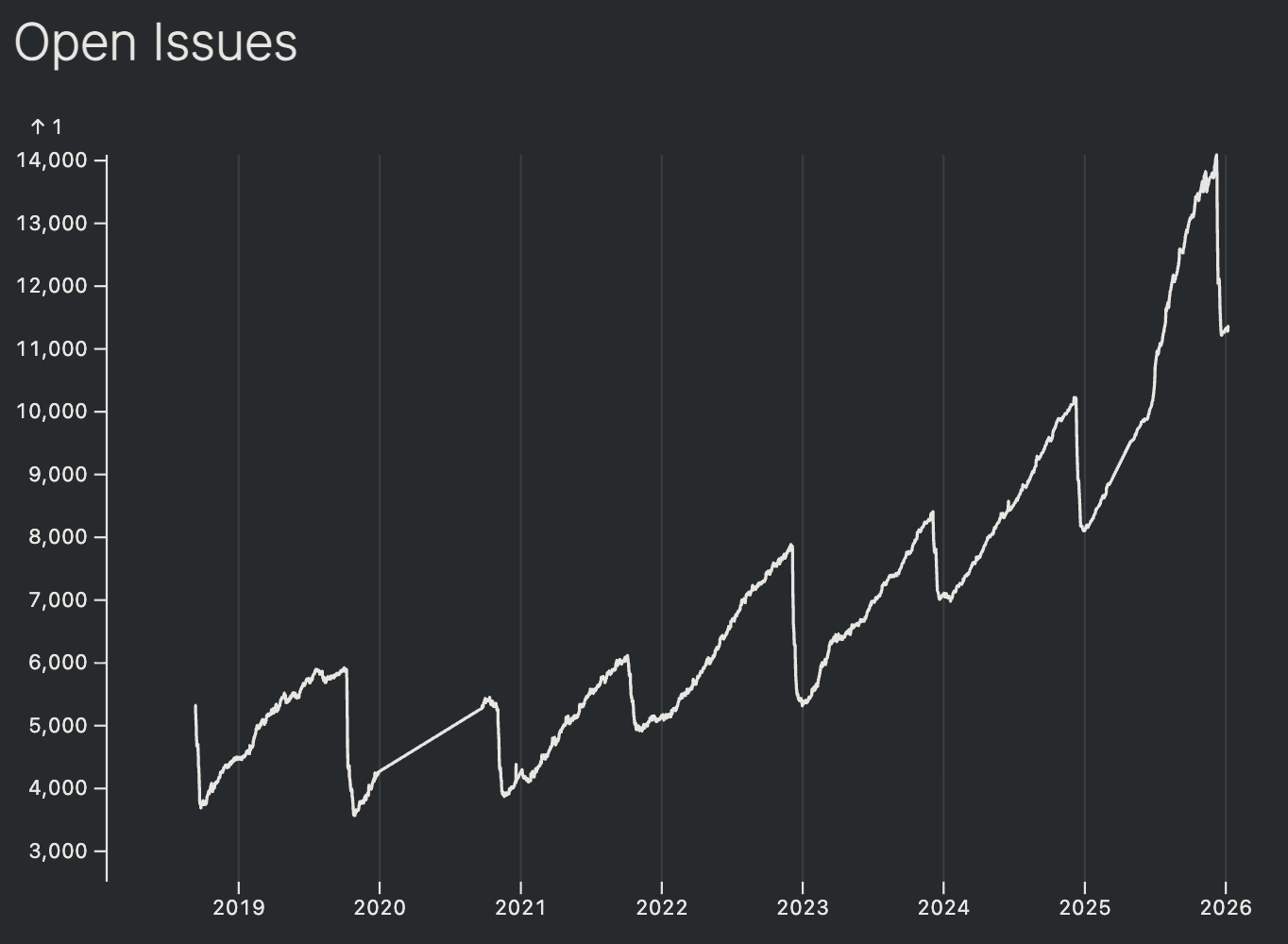
Below is a graph that shows how our core vscode repository has grown over the years, and how many issues our amazing community has contributed over time. We appreciate everyone who has contributed issues to our repositories over the years and continued to engage with us. Your feedback is what has made VS Code the product that it is today! 🚀
Authoring extensions in TypeScript (Experimental)
It is now possible to author VS Code extensions directly in TypeScript without requiring a build step. This works... but there is still a bit of adventure involved! Many aspects are still untested, such as how to write and run tests, how to publish extensions, and other workflow considerations.
Learn more about this experimental approach in this GitHub comment.
Notable fixes
- vscode#283356 - Fixed regression causing jumping around while scrolling past some chat output
Thank you
Contributions to vscode:
- @abhijit-chikane (Abhijit Chikane): fix: hover focus border cutting at the corners PR #259548
- @alievilshat (Ilshat Aliyev): Fixed wrong negation in the _shouldRenderHint logic. PR #242479
- @Andarist (Mateusz Burzyński): Simplify
TestInstantiationService#stuboverloads PR #282223 - @anki-code (Andy Kipp): Added Xonsh shell type PR #284044
- @aryla (Arttu Ylä-Outinen): Fix sticky scroll hover listeners piling up PR #260020
- @AviVahl (Avi Vahl): fix: ensure fallback to default system monospace font PR #282747
- @BartolHrg: fix copy with multiple cursors and empty selections PR #256083
- @Beace (Beace): fix: fix terminal webgl context memory leak PR #279579
- @bibaswan-bhawal (Bibaswan Bhawal): fix(extensions): allow extensionButton.prominentBackground to take effect PR #276788
- @chaitanyamedidar (Chaitanya Medidar): Fix Swipe to navigate setting missing description #281997 PR #282220
- @CyMad7001 (Cyril Madigan): #196344 - Fix installer hang issue PR #228233
- @daiyam (Baptiste Augrain): fix: correctly pass extension's id when version is also provided PR #279630
- @eidriahn (Adrian Luca): fix: fixes icons not showing when hovering quick pick checkboxes PR #285250
- @erezak (Erez Korn): Chat: hide Apply in Editor from Command Palette PR #283486
- @flying-sheep (Philipp A.): fix: set LANGUAGE for Git PR #285410
- @gjsjohnmurray (John Murray): Standardize the breadcrumb toggle option label (fix #257550) PR #284486
- @hickford (M Hickford): Reverse lines: apply to whole document when selection is single line PR #257031
- @irengrig (Irina Chernushina): Fix memory leak with installing cursor change position listener PR #267799
- @isksss (isksss): Update: Fixed so that MARK can be used in vue files etc. PR #283583
- @izolotarev (Igor): Fix color detection in hsl saturation PR #266720
- @jakebailey (Jake Bailey): Replace old-style TS modules with namespaces PR #282862
- @jcpetruzza (Daniel Gorin): debug: Fix UI freezing on "continue" with high number of threads PR #283635
- @JeffreyCA: Update Fig spec for Azure Developer CLI (azd) PR #281127
- @joeriddles (Joe Riddle): Add snakecase to snippets syntax PR #237110
- @josephxiao8 (Joseph Xiao): Expected Final Selection After Running Delete Duplicate Lines PR #234799
- @junhaoliao (Junhao Liao): Suppress unhandled errors in WordHighlighter's runDelayer triggers. PR #285887
- @kheif (Mehmet Ege Aydın): workbench: add commands to move editor to start and end PR #284999
- @kortin99 (Kortin Zhou): feat(snippets): add support for kebab-case in snippets tmLanguage syntax PR #222319
- @maynkxx (mayank choudhary): docs: update Twitter branding to X in README PR #280235
- @milanchahar (MILAN CHAHAR): Fix terminal icon picker placement PR #281275
- @mizdra (mizdra): Fix tests that failed in environments where
XDG_DATA_HOMEis set PR #285402 - @MohamedEmirHajji (Mohamed Emir HAJJI)
- Add more git log options to completions PR #282311
- Markdown preview: filter hidden elements from scroll sync (fix #281247) PR #282506
- @murataslan1 (Murat Aslan)
- fix: avoid jumpy scrolling when navigating next/prev problem PR #285634
- Fix: Replace terminal tabbed view lifecycle hack with Event.once PR #285657
- Fix: Replace terminal view lifecycle hack with Event.once PR #285661
- @NriotHrreion (Norcleeh): fix: Latest input is not stored to the history when sending message to a new chat PR #282633
- @odinGitGmail (odinsam): fix(debug): support C# stack trace format in debug console links PR #281536
- @przpl: fix(runSubagent): collect computed attachments PR #283750
- @rducom (Raphael DUCOM): Fix ReDoS in PowerShell prompt detection PR #279853
- @RedCMD (RedCMD)
- Add TS/JS Template surrounding brackets PR #255972
- Fix php indenting #248229 PR #258016
- Fix FormatOnSave when
modificationsIfAvailablePR #283726 - Support
# pragmafolding markers in C PR #284927
- @remcohaszing (Remco Haszing): Fix editor edge clicking PR #262964
- @Riya-chandra (RIYA_CHANDRA): Show command descriptions as tooltips in Command Palette PR #284609
- @SalerSimo (Simone Salerno)
- Exclude terminal editors from recently closed editors history PR #282009
- Refactor virtual model creation logic in MoveLinesCommand PR #284785
- @SimonSiefke (Simon Siefke)
- fix: memory leak in terminal editor PR #279088
- fix: memory leak in terminal process PR #279167
- fix: memory leak in terminal process PR #279172
- fix: memory leak in accessibility signal PR #279242
- fix: memory leak in local process extension host PR #279351
- fix: memory leak in extension icon widget PR #280566
- fix: memory leak in markdown hover PR #280745
- fix: memory leak in debug session PR #281767
- fix: memory leak in status bar PR #282246
- fix: memory leak in ipc PR #282253
- fix: memory leak in chat list renderer PR #282560
- fix: memory leak in notebook code scrolling PR #283452
- fix: memory leak in terminal find widget PR #283466
- fix: memory leak in mainThreadLanguages PR #283498
- fix: memory leak in chat widget PR #284288
- fix: memory leak in terminal chat widget PR #284325
- fix: memory leak call stack widget PR #286246
- @sudip-kumar-prasad (Sudip Kumar Prasad): Fix: use codicon id for Command Prompt default profile icon PR #280967
- @tamuratak (Takashi Tamura)
- fix: ensure finishedEditing is called in ChatWidget PR #281763
- include uppercase
-Iin sed in-place option detection PR #284645 - Fix context handling in ChatWidget while re-editing PR #285099
- @ThanhNguyxn (Thanh Nguyen): fix: Panel doesn't close when maximized and center-aligned (fixes #281772) PR #281773
- @tharani-2006: Terminal: show dimensions overlay while resizing PR #284244
- @tt0mmy (Tommy): Fix duplicate description in terminal suggestion config PR #279730
- @yavanosta (Dmitry Guketlev)
- Fix backward selection when EditContext is off PR #273150
- InlineEditsView: remove redeclaration of textModel PR #281501
- SingleUpdatedNextEdit: Correctly apply insertion changes PR #281519
Contributions to vscode-copilot-chat:
- @AbdelrahmanAbouelenin (ababouelenin): Update system prompt for VSCModelB. PR #2727
- @bharatvansh (Ayush Singh): fix(byok): improve Gemini provider error handling and add tests PR #2686
Contributions to vscode-js-profile-visualizer:
- @xiaoxiangmoe (ZHAO Jin-Xiang): chore: remove useless package-lock.json files PR #216
Issue tracking
Contributions to our issue tracking:
- @gjsjohnmurray (John Murray)
- @RedCMD (RedCMD)
- @tamuratak (Takashi Tamura)
- @IllusionMH (Andrii Dieiev)
- @albertosantini (Alberto Santini)
We really appreciate people trying our new features as soon as they are ready, so check back here often and learn what's new.
If you'd like to read release notes for previous VS Code versions, go to Updates on code.visualstudio.com.